


GoHighLevel features go far deeper than most teams realize after their first login. Agencies, coaches, and service businesses adopt the platform to consolidate a scattered tool stack, then spend weeks figuring out which module to configure first and how CRM, workflows, funnels, and calendars fit together.
Misconfigure your pipeline or skip the automation layer and leads stall silently. Build the foundation in the right order and one subscription replaces six separate tools. Below, we walk through every core module in the order you would actually set up a new account.
What Is GoHighLevel CRM (and Why It Matters in 2026)?
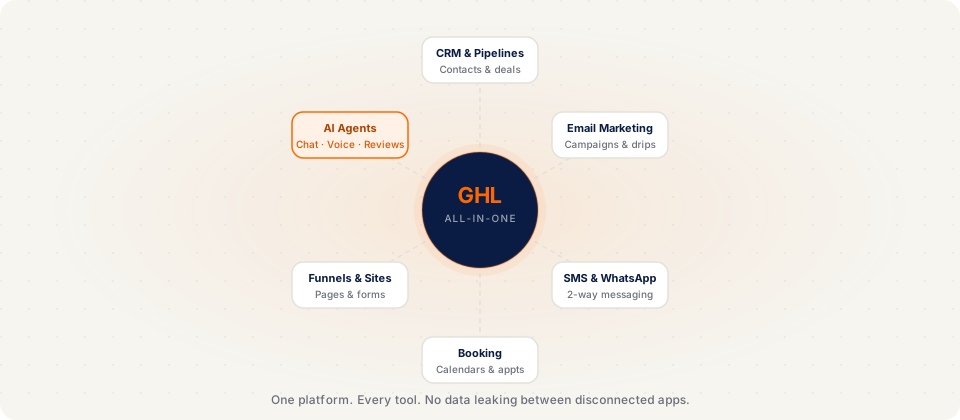
GoHighLevel CRM (usually shortened to GHL) is the core of a broader marketing and operations platform built for agencies and service businesses. Most CRMs stop at contact records, deal stages, and a basic activity log. GoHighLevel starts there, then connects every follow-up channel, capture page, calendar, and automation to the same contact record so nothing lives in a separate tool.
That design choice matters because agencies and local operators rarely fail on strategy. They fail on execution across a fragmented stack: leads captured in one app, booked in another, nurtured in a third, and invoiced in a fourth. GoHighLevel was built around the opposite premise: that modern marketing operations should run from one system, not eight subscriptions held together with Zapier and spreadsheets.
| Standalone tool | Built into GoHighLevel |
|---|---|
| HubSpot, Pipedrive, or Keap | Native CRM with unlimited contacts, visual pipelines, tasks, and a unified inbox for every channel |
| Mailchimp or ActiveCampaign | Email campaigns and nurture sequences wired directly to workflows and contact tags |
| Twilio or a standalone phone system | Two-way SMS, outbound calling, voicemail drops, and call tracking on one number |
| Calendly or Acuity | Round-robin, class, and service calendars with two-way Google and Outlook sync |
| ClickFunnels or Leadpages | Drag-and-drop funnels, landing pages, order forms, and A/B testing |
| WordPress plus plugins | Multi-page websites with hosting, domains, and SEO settings inside GHL |
| ManyChat or Drift | Conversation AI for web chat, Facebook, Instagram DMs, and SMS from one inbox |
| Stripe plus a billing portal | Invoices, subscriptions, payment links, and checkout connected to the CRM |
| Skool, Circle, or Kajabi | Membership areas, course delivery, drip content, and tier-gated community access |
In practice, many agencies and service businesses replace $400 to $1,500 per month in overlapping SaaS fees with a single GoHighLevel plan. The bigger win is integration: when CRM, calendar, funnels, and SMS share one database, a booked appointment can update a pipeline stage, fire a reminder sequence, and queue a review request without webhooks, sync delays, or manual exports. That is why GoHighLevel matters in 2026, not because it lists more features on a pricing page, but because those features actually run as one system. If you want the high-level platform overview first, read what GoHighLevel is, then continue here for the module-by-module breakdown.
What's New in GoHighLevel for 2026
HighLevel shipped several major updates in late 2025 and early 2026 that change how agencies configure client accounts. These releases matter because they expand what you can deliver inside GHL without bolting on third-party tools.
- Unified AI knowledge base: Conversation AI, Reviews AI, Content AI, and Funnel AI now share one training context. Configure your business information once and every AI module pulls from the same source instead of duplicating setup across tools.
- Voice AI and AI Employee: Inbound and outbound voice agents handle calls, qualify leads, and book appointments at usage-based rates, often far below the cost of a full-time receptionist. See our GoHighLevel AI features guide for deployment details.
- AI Ad Manager: Automated ad creation, deployment, and attribution with server-side tracking designed to hold up as browser privacy rules tighten. Useful for agencies running paid acquisition inside client sub-accounts.
- Mobile App v4.0: A full mobile experience for pipelines, conversations, payments, and calendar management, closer to desktop parity than earlier releases, which matters for field teams and agency owners who live on their phones.
- Online Store and gift cards: Native e-commerce for physical products, digital downloads, gift cards, and installment plans without routing checkout through an external storefront.
- Communities: Paid community spaces with discussion threads, member directories, and tier-gated access, relevant for coaches and membership businesses that previously paid for a separate community platform.
Who GoHighLevel CRM Is Built For (And Who It Isn't)
GoHighLevel is powerful, but it is not universal. After configuring accounts for agencies, coaches, and appointment-based businesses week after week, the same fit pattern shows up: teams that sell services and follow up on leads thrive; teams that need enterprise CRM governance or product-led SaaS analytics often do not.
Getting honest about that before you migrate saves the cost of rebuilding pipelines, re-wiring integrations, and paying for a second stack because GHL was the wrong foundation. Below is who the platform is built for, and who should look elsewhere.
GoHighLevel Is the Right Choice For
- Marketing and client-service agencies: If you serve five or more clients on retainer, GoHighLevel's white label and SaaS Mode is hard to beat. Deliver a branded portal on your domain, bill through Stripe automatically, and offer a full marketing stack (CRM, funnels, SMS, and reporting) instead of only campaign management. The platform exists largely because agencies needed something HubSpot was not building for resellers.
- Appointment-based service businesses: Med spas, salons, home services, dental practices, chiropractors, real estate teams, and gyms where revenue depends on booked appointments. The native calendar, SMS, missed-call recovery, no-show follow-up, and review automation work together better than juggling Calendly, a phone system, and a separate CRM.
- Coaches and consultants selling programs: If you sell coaching, consulting, or training packages between roughly $500 and $25,000, GoHighLevel covers funnels, application forms, sales call booking, payment plans, course delivery, and member communities in one login, replacing a patchwork of Kajabi, Calendly, email tools, and a standalone community app.
- Solo operators ready to systematize: One-person businesses that want infrastructure before they hire can run the full platform on Starter at $97 per month. You do not need white label until you are reselling to multiple clients; until then, focus on CRM, one workflow, and one capture path. See GoHighLevel pricing for plan details.
GoHighLevel Is the Wrong Choice For
- Enterprise sales orgs with 100+ reps: Salesforce and HubSpot Enterprise still win when you need advanced permissions, custom objects, territory management, and deep ERP integrations. GoHighLevel can host many users, but the UX and reporting model target agencies and service businesses, not global inside-sales teams.
- Pure product-led SaaS companies: If your business sells software and your CRM must track product usage, trials, and expansion revenue, GoHighLevel's marketing-first design will feel limiting. HubSpot, Customer.io, or dedicated product analytics stacks fit that model more naturally.
- Strict compliance-first environments: GoHighLevel supports GDPR, CAN-SPAM, and TCPA workflows, but organizations that require SOC 2 Type II attestations, HIPAA business associate agreements, or financial-grade audit trails should validate requirements with HighLevel's compliance team before committing, especially in healthcare.
- Businesses anchored to legacy enterprise systems: If Salesforce, NetSuite, or proprietary internal tools are the system of record, migrating marketing into GHL while keeping everything in sync can mean heavy API and middleware work. GoHighLevel's API is capable for most agency use cases, but it is not a replacement for an enterprise integration platform. Map integration scope before you move.
Quick Verdict: GoHighLevel Features
GoHighLevel is the right all-in-one stack if you need CRM, multi-channel communication, funnels, calendars, automation, and optional white label resale under one subscription. Start with CRM and workflows before you add AI, SaaS Mode, or advanced integrations. Every plan includes the full feature set; plan tier mainly controls sub-account limits, API access, and reselling capability.
| Module | Purpose | Plan Availability |
|---|---|---|
| CRM and pipelines | Contact records, stages, unified inbox | All plans ($97 Starter and up) |
| Workflows and automation | Triggers, conditions, multi-channel actions | All plans |
| Funnels, sites, forms | Capture, sell, and publish pages | All plans |
| SMS, email, WhatsApp, voice | Two-way communication from one record | All plans; usage billed separately |
| Calendars and booking | Scheduling, reminders, round-robin | All plans |
| AI suite | Conversation, Voice, Reviews, Content AI | All plans; pay-as-you-go or add-on usage |
| White label + SaaS Mode | Rebrand platform; resell with Stripe billing | Unlimited ($297) branding; Agency Pro ($497) SaaS Mode |
How to Set Up Your GoHighLevel Account (First 30 Minutes)
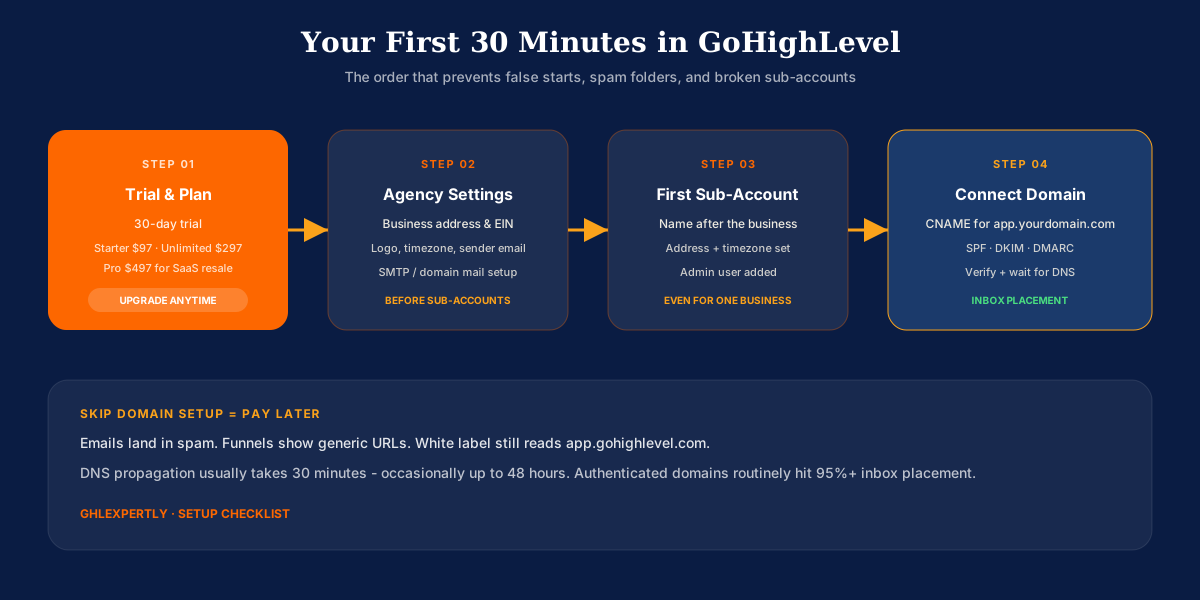
Most new GoHighLevel users spend their first hour hunting for a getting-started guide inside the platform. There is not one, so the order below is the sequence we use on live accounts to avoid the false starts that waste a full weekend.
These four steps happen at the agency level before you build pipelines, workflows, or funnels inside a sub-account. Skip them and you will redo DNS, compliance, and branding later under pressure.
Activate Your Trial and Choose Your Plan
Start with GoHighLevel's free trial. You get full Agency Starter functionality while testing; add billing before the trial ends to keep the account live. You can upgrade or downgrade later without penalty, so starting on Starter and moving up is normal.
- Starter ($97/mo): One business or solo operator validating the platform. Includes the full feature set with up to three sub-accounts.
- Unlimited ($297/mo): Three or more client sub-accounts you manage on the platform, plus white-label branding on Unlimited.
- Agency Pro ($497/mo): Reselling GoHighLevel as your own software through SaaS Mode with Stripe billing and automated provisioning. See GoHighLevel SaaS Mode if that is your model.
Configure Your Agency Settings
Before creating sub-accounts or importing contacts, lock in agency-level settings. This parent configuration flows down to every client account you add later.
- Business identity and compliance: Add your business address, phone number, and tax ID. You will need this information for A2P 10DLC SMS registration before sending campaigns at scale.
- Brand assets: Upload your logo in standard (roughly 200x60px), favicon (32x32px), and email header (600x150px) formats so client-facing emails and login screens look professional from day one.
- Time zone and sender defaults: Set the agency default time zone; it becomes the baseline for new sub-accounts. Configure system email sender details (for example notification@yourdomain.com) and connect SMTP if you are not using HighLevel's default Mailgun delivery.
Create Your First Sub-Account
Sub-accounts separate clients (or business units) inside your agency parent. Even if you only run one company, create at least one sub-account for that business. The agency shell is the container; the sub-account is where CRM, funnels, and workflows live.
- Name it properly: Use the real business name, not Test Account. You will snapshot and clone this structure later if you are an agency.
- Set location and time zone: Add the business address; it affects email deliverability and SMS compliance. Set the time zone explicitly even if it matches the agency default.
- Add an admin user: Create at least one user with admin permissions (yourself) so permissions and notifications are configured before you invite clients or VAs.
Connect Your Domain
Domain connection is the most skipped step and the one that causes the most pain later. Without it, emails land in spam, funnels show generic URLs, and white-label logins still display app.gohighlevel.com.
Add a CNAME pointing app.yourdomain.com to GoHighLevel hosting, publish SPF, DKIM, and DMARC records for email authentication, then verify ownership inside GoHighLevel settings. DNS propagation usually completes within 30 minutes but can take up to 48 hours.
Authenticated sending is the difference between strong inbox placement and losing half your follow-up to spam folders. If DNS is not in your wheelhouse, our GoHighLevel setup service handles domain, email, and SMS infrastructure so you do not launch on broken deliverability.
What Is Included in GoHighLevel?
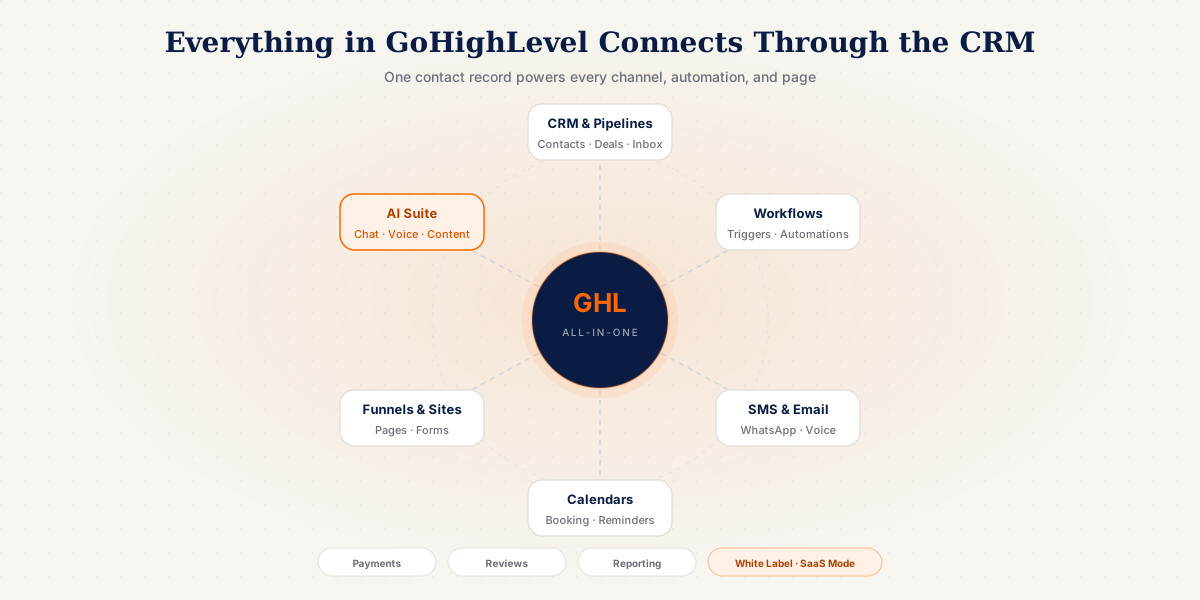
GoHighLevel is an all-in-one sales and marketing platform that combines CRM, email, SMS, funnel builder, website builder, calendars, automation workflows, reputation management, AI tools, and white label SaaS capabilities under one subscription. A traditional CRM stores contacts and tracks deals. GoHighLevel does that, then keeps going.
This guide is written for agencies managing multiple client accounts, coaches and service businesses replacing a scattered tool stack, business owners deciding whether GoHighLevel can consolidate their CRM, funnels, email, and booking, and operators who want to understand every feature before building. If you are still asking the more basic question of what the platform is at a high level, start with what GoHighLevel is, then return here for the feature-by-feature breakdown.
Complete Guide to GoHighLevel Features
Below is every core GoHighLevel feature module explained in the order you would typically configure a new account: CRM first, then automations, then capture tools, communication, booking, AI, and resale capabilities.
CRM and Pipeline Management
The CRM is the foundation everything else plugs into. Every lead becomes a contact record with a full activity timeline: every email, text, call, form fill, and appointment in one view. Contacts are segmented with tags and custom fields, which then trigger automations and control who receives what. For a deep dive on contacts, pipelines, and the unified inbox alone, see our GoHighLevel CRM guide.
You build one or more visual pipelines that mirror how you actually sell. A lead moves from New through Nurturing to Won, and each stage change can fire an automation. Every conversation across every channel lands in one shared inbox. Done right, your pipeline becomes the live source of truth for revenue. When a pipeline is misconfigured, leads stall silently, which is exactly what a GoHighLevel consultant audits first.
Marketing Automation and the Workflow Builder
The Workflow Builder is where GoHighLevel earns its reputation. It is a visual, drag-and-drop canvas built on triggers, conditions, and actions. A form submission, booking, tag added, pipeline stage change, or missed call can start a workflow that sends SMS, email, moves pipeline stages, creates tasks, and branches on contact behavior.
A single workflow can handle multi-channel follow-up end to end: tag and add to pipeline, send instant SMS and welcome email, follow up if they have not booked in 24 hours, and notify a sales rep once they do. See our GoHighLevel workflows guide for fifteen proven use cases.
Funnels, Websites, and Forms
GoHighLevel includes a full page builder, so you do not need a separate funnel or website tool. Multi-step sales flows, full multi-page sites, and native lead-capture forms push responses straight into contact records and trigger workflows.
Start from ready-made funnel templates and website templates instead of building from a blank page. After launch, live social proof for GoHighLevel funnels replays real form submissions, bookings, and checkouts as on-page notifications, so first-time visitors see activity instead of a static page. Build pages with SEO and Core Web Vitals in mind, and track how your brand surfaces in AI-generated answers with an AI search visibility tool as buyer research shifts beyond traditional search. Bloated funnels are a common problem when speed and structure are ignored.
Multi-Channel Communication
Communication is where GoHighLevel replaces the most tools at once. Email marketing, two-way SMS, WhatsApp, voicemail drops, calls, and Facebook and Instagram DMs all run from the same contact record and the same automations.
Because every channel shares one contact history, a lead who gets an email, replies by text, and later books a call is still a single, unbroken conversation. SMS, calls, email sends, and AI actions are billed on usage, separate from your plan price. Budget for that from day one in our GoHighLevel pricing guide. Agencies sending high SMS volume sometimes pair workflows with carrier-native CRM messaging, routing texts through their own SIM at flat monthly cost instead of per-message carrier fees and lengthy A2P registration. For WhatsApp specifically, see our GoHighLevel WhatsApp integration guide.
Calendars and Appointment Booking
The built-in calendar system replaces standalone scheduling tools. Round-robin, class, and service calendars sync with Google and Outlook. Every booking can auto-send confirmations and reminders, and missed appointments can trigger rebooking sequences. Calendars embed directly into funnels so leads book without leaving the page.
AI Features in GoHighLevel
AI is built directly into the platform. Conversation AI handles website and inbound messages. Voice AI answers phone calls in natural conversation. Reviews AI drafts review responses. Content AI generates copy. Funnel AI and the Workflow AI Builder assist with page and automation creation.
These tools are available across all plans on a pay-as-you-go or add-on basis. AI chatbot and workflow setups from a GoHighLevel developer plug these agents into your pipeline so they qualify and book without human intervention. See our complete GoHighLevel AI features guide for deployment details. Teams that want a dedicated AI sales agent for inbound lead capture (with website chat, lead scoring, and CRM sync) often run it alongside native Conversation AI when they need deeper training data or a custom widget outside the sub-account.
Reputation, Payments, Reporting, and Resale
GoHighLevel automates review requests after service delivery, monitors Google and Facebook reviews from one dashboard, and closes the loop from lead to paid customer with invoices, subscriptions, Stripe and PayPal checkout, and contracts inside the CRM. Custom dashboards track pipeline value, conversion rates, campaign performance, and lead source attribution.
White-label branding rebrand the dashboard, domain, and login with your logo. SaaS Mode packages the platform into subscription plans with automatic Stripe billing and sub-account provisioning. Snapshots capture complete pre-built systems that install into new client accounts instantly. Browse ready-to-install GoHighLevel snapshots to get a proven system live quickly. Native connections include Google, Facebook, Instagram, WhatsApp, Stripe, PayPal, Shopify, and more, plus Zapier, Make, and API V2 with OAuth 2.0 for custom builds. When those hooks are not enough (bespoke client portals, middleware, or complex ERP bridges), a custom software development company can extend the stack without replacing GoHighLevel as your CRM core.
Who Should Use Which GoHighLevel Features?
GoHighLevel bundles more than most teams need on day one. The profiles below show which modules matter most so you do not overbuild or skip the features that actually drive revenue.
Agencies Managing Client Sub-Accounts
Agencies should prioritize CRM, workflows, snapshots, and white label on Unlimited or Agency Pro. SaaS Mode matters when you resell the platform as your own product. Every client gets isolated data with repeatable deployment from master snapshots.
Local Service Businesses
Service businesses should lean on SMS, missed call text-back, calendars, review requests, and simple pipelines before advanced AI. Speed-to-lead and appointment booking deliver ROI faster than funnel complexity.
Coaches and Consultants
Coaches benefit most from funnels, calendars, email nurture workflows, and payment pages connected to one pipeline. Content and course features matter when your delivery model includes memberships or programs.
Solo Operators on Starter
Starter at $97 per month includes the full platform with up to three sub-accounts. Solo operators should master CRM, one core workflow, one funnel, and calendar booking before adding AI or resale features they do not yet need.
Things to Consider Before Building Your GHL Stack?
GoHighLevel is powerful because it does so much, which is also why rushed setup creates broken automations and unused modules. Review these factors before you configure every toggle in a new account.
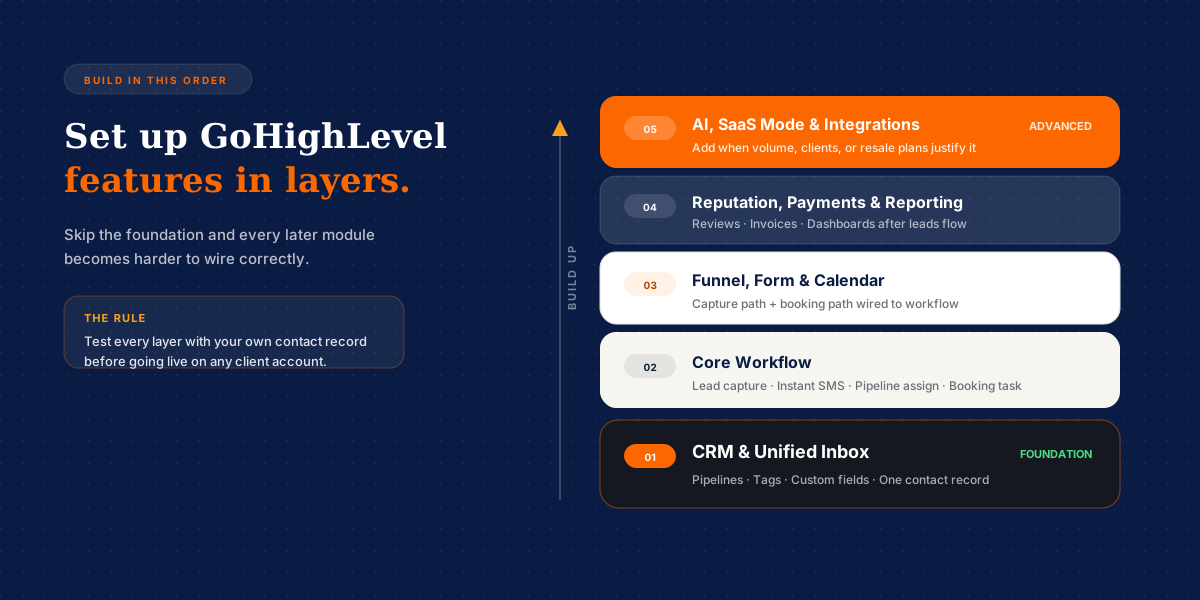
- Build order: CRM and inbox first, workflows second, capture and booking third. Skipping the foundation makes every later module harder to wire correctly.
- Usage-based costs: SMS, email volume, calls, and AI are billed separately from plan fees. Model usage before you promise unlimited texting to clients.
- Plan tier vs actual needs: Starter works for solo businesses. Unlimited fits growing agencies. Agency Pro is for SaaS resale, not every small client account.
- Testing before launch: Run every workflow with your own contact record before going live. Broken automations on client accounts erode trust fast.
- Migration complexity: Moving from another CRM requires planned contact, pipeline, and automation migration. Rushed imports break live sequences.
- Build vs hire: A proper build goes live in days with tested workflows. DIY trial-and-error often costs more in lost leads than expert setup.
Which Features Should You Set Up First?
Set up CRM pipelines and the unified inbox first. Define stages that match how you sell, add tags and custom fields you will use in automations, and confirm every channel routes into one contact record.
Build one core workflow second: new lead capture, instant SMS or email, pipeline assignment, and a booking or sales task. This single automation proves the stack works before you add complexity.
Launch one funnel or form plus calendar third. Leads need a capture path and a booking path connected to the workflow you tested in step two.
Add reputation, payments, and reporting fourth once leads flow reliably. Review requests and invoicing matter after you have consistent delivery, not before the pipeline works.
Layer AI, SaaS Mode, and advanced integrations fifth when call volume, client count, or resale plans justify the extra configuration and usage cost.
Concluding Remarks on GoHighLevel Features
Start with your CRM pipeline and unified inbox, then layer workflows, funnels, and calendars on top of that foundation. Build and test with your own contact record before going live on any client account. Agencies should build once in a sandbox sub-account and deploy via snapshot to every client.
A core setup with pipelines, calendars, and automations typically takes 5 to 10 business days. A full build with AI agents, multi-step funnels, and integrations can take 2 to 4 weeks. When you are ready to build the system properly the first time, book a free strategy call and we will audit your setup and map exactly what to build.