



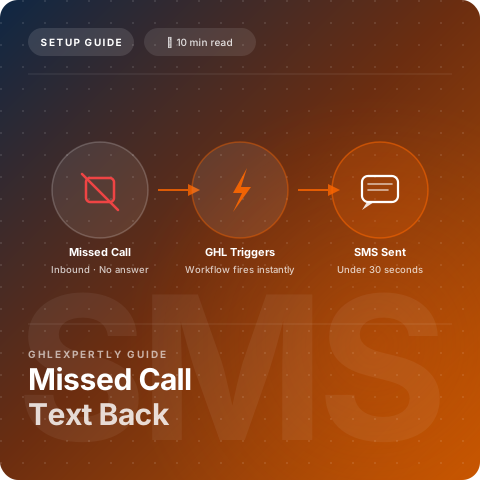
GoHighLevel missed call text back is the automation local businesses ask for first, and the one that pays for itself fastest. When your team is on a job site, in a showing, or closed for the night, unanswered inbound calls do not wait. Most callers hang up, skip voicemail, and dial the next business on Google.
A single automated SMS when nobody picks up keeps the conversation alive, routes replies into your unified inbox, and triggers follow-up workflows without anyone manually chasing the lead. Below, we walk through how missed call text back works inside GoHighLevel, how to configure it in under 30 minutes, and what ROI looks like for local businesses and agencies.
Quick Verdict: GoHighLevel Missed Call Text Back
Enable missed call text back on every GoHighLevel account that receives inbound phone leads, especially local service businesses, real estate teams, and professional offices where staff cannot answer every ring. Skip it only if phone calls are not a lead source or you already answer every call with Voice AI or live staff. For most local businesses, one recovered job per month covers months of SMS usage costs.
| Factor | Missed Call Text Back | Voicemail Only |
|---|---|---|
| Trigger | Workflow fires on missed or no-answer call status | Caller decides whether to leave a message |
| Response rate | Most callers reply to SMS; few leave voicemail | Industry data shows low voicemail completion |
| Speed | SMS sends within seconds of missed call | Staff listens to voicemail later, often hours later |
| Conversation | Two-way thread in unified CRM inbox | One-way message; no instant reply path |
| Automation | Tags, follow-up sequences, booking links in workflows | Manual callback unless integrated elsewhere |
| Cost | Included automation; standard GHL SMS usage rates | No SMS cost; higher lost-lead cost |
What Is GoHighLevel Missed Call Text Back?
Missed call text back is an automation that fires when an inbound call to your GoHighLevel phone number is not answered. The system sends a predefined SMS to the caller inviting them to reply with their question or book an appointment, triggered automatically inside a GoHighLevel workflow.
The reply arrives in GoHighLevel's unified CRM inbox alongside SMS, email, and social messages. Your team responds from one screen with full conversation history attached to the contact record. Unlike voicemail, text back starts a two-way conversation. Most callers will not leave voicemail. They will text back, book through a link, or move on to the next business. Missed call text back captures the ones willing to engage.

Complete Guide to Setting Up Missed Call Text Back
Configuration happens inside a GoHighLevel workflow with a call status trigger. The setup takes under 30 minutes once you understand the components below.
Phone Number and Workflow Setup
Purchase or port a local number inside the Phone System settings of your sub-account. Route your public-facing business line to the GoHighLevel number, or port it directly so missed call detection fires on the line customers actually call. Verify call tracking and recording settings meet your compliance requirements before enabling any automations.
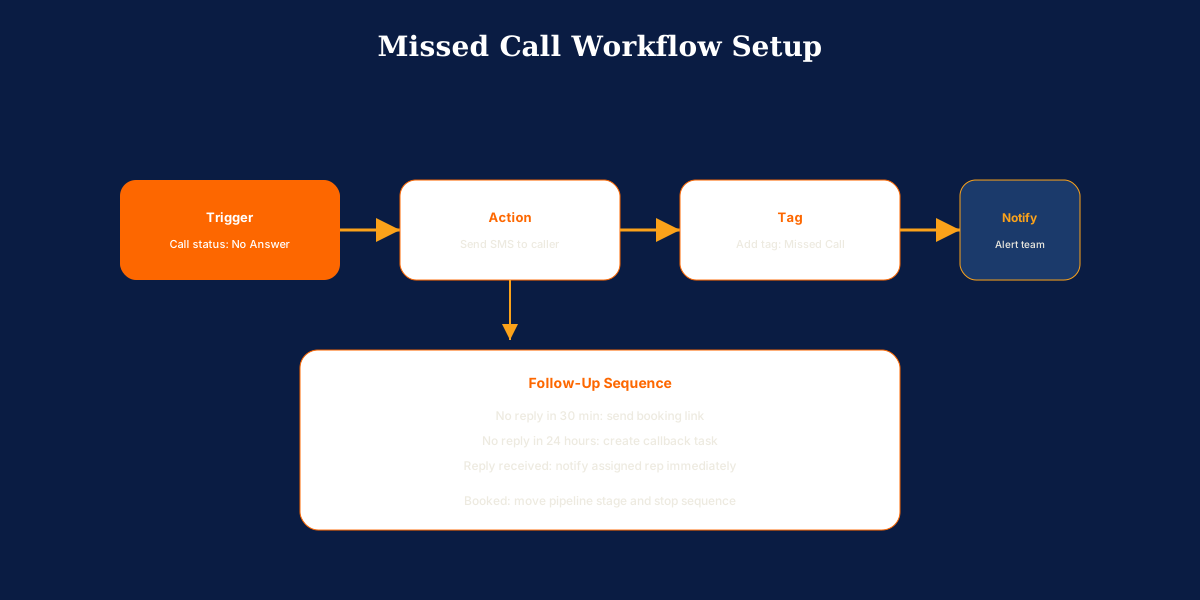
Create a new workflow with the trigger set to Call Status equals No Answer or Missed Call, depending on your account version. Add a business hours filter if you want different behavior after hours or on weekends. Add a Send SMS action immediately after the trigger. Keep the message under 160 characters, friendly, and action-oriented. Add a tag action to mark contacts as Missed Call for reporting and follow-up segmentation. Optionally add an internal team notification so your staff knows a text back was sent and a reply may be incoming.
Follow-Up Workflows and Recovery Sequences
Missed call text back works best as the first step in a multi-touch recovery sequence. If there is no reply within 30 minutes, send a second SMS with a direct booking link. After 24 hours with no reply, add the contact to a nurture workflow or create a manual callback task.
When they reply, route the conversation to the assigned rep via round-robin or pipeline stage update. This is a warm lead; treat it with priority. Pair missed call recovery with speed-to-lead form automations and review request workflows to build a complete inbound system.
Testing, Compliance, and Best Practices
Call your GoHighLevel number from a personal phone and let it ring unanswered. Confirm the SMS arrives within seconds and the contact record is created or updated in the CRM. Verify the correct tags are applied and the message appears in the unified inbox. Test after-hours behavior separately if you configured business hours filters.
Never enable on a client account without a full end-to-end test. A misconfigured workflow that texts answered calls creates spam and damages trust instantly. Follow SMS compliance rules: confirm appropriate consent for text communication and include opt-out language where required. Keep the first SMS under 160 characters, include your business name, and offer two clear paths: reply to the text or click a booking link. Set honest business hours expectations in the message copy.
Who Should Enable Missed Call Text Back?
Phone calls still drive revenue in many local and high-touch businesses, and missed calls are a daily reality. The profiles below benefit most from automatic text-back recovery.
Home Services and Field Teams
Technicians miss calls while on job sites. Every unanswered ring is a job potentially sent to a competitor. See how GoHighLevel helps home services businesses recover them with SMS follow-up tied to the CRM.
Real Estate Agents and Teams
Agents miss calls during showings. A missed call from a motivated buyer can mean a lost deal. Our real estate guide covers exactly how to automate follow-up when nobody answers.
Medical and Professional Offices
Front desks miss calls during patient intake or client meetings. Automated text back keeps the appointment pipeline moving without adding staff hours.
Agencies Deploying Local Business Snapshots
Agencies deploying GoHighLevel to local business clients should include missed call text back in every client snapshot. It is easy to configure, immediately measurable, and produces visible ROI that builds client trust.
Things to Consider Before Turning It On?
Missed call text back is simple to configure but easy to misconfigure. Review these factors before you enable the workflow on a live business line.
- Correct call routing: The GHL number must be the line customers call, or your main line must forward to it. Otherwise the missed call trigger never fires.
- Answered-call false triggers: Wrong trigger logic can text people who were actually answered. Test thoroughly before client launch.
- SMS compliance and consent: Confirm your business has appropriate consent to text callers and include opt-out language where required.
- Business hours messaging: After-hours copy should set honest expectations. Promising an immediate callback when nobody is available erodes trust.
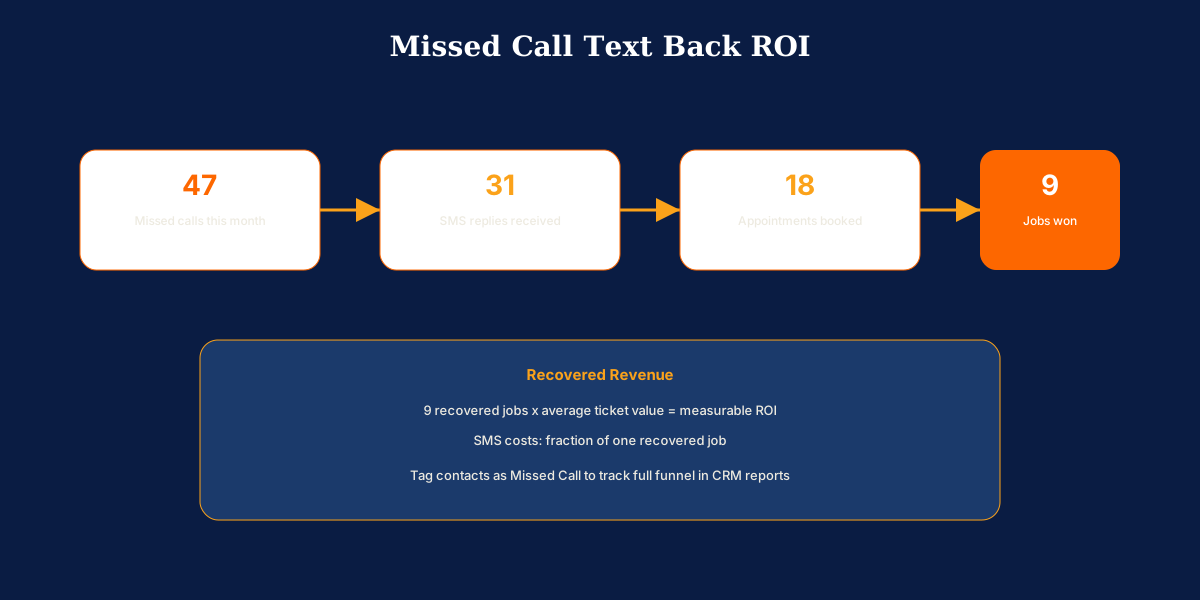
- Tagging and reporting: Tag every missed-call contact so you can measure reply rate, booking rate, and recovered revenue in monthly reports.
- Voice AI overlap: GoHighLevel AI features include Voice AI for live call answering. Many businesses use Voice AI during hours and missed call text back for after-hours overflow.
Which Missed Call Setup Should You Use?
Choose basic missed call text back if you need a fast win on a single business line. One workflow, one SMS, one tag, and inbox monitoring is enough to recover leads that would otherwise disappear.
Choose business-hours split messaging if your team is unavailable nights and weekends. Use filters to send different copy after hours that sets expectations and offers booking links for the next available window.
Choose multi-step recovery sequences if you want maximum conversion. Add a second SMS with a booking link after 30 minutes, a nurture workflow after 24 hours, and pipeline routing when the contact replies.
Choose Voice AI plus text back if call volume is high. Voice AI handles live answering during business hours. Missed call text back catches overflow and after-hours calls Voice AI does not answer. Start with text back and add Voice AI when volume and budget justify the upgrade.
Concluding Remarks on GoHighLevel Missed Call Text Back
If you run a GoHighLevel account for a local business, build this workflow today. It takes under 30 minutes and typically produces measurable results within the first week. Add missed call text back to every snapshot you deploy, monitor replies in the CRM inbox, and include recovery metrics in monthly client reports: replies, bookings, and estimated recovered revenue.
Need missed call text back configured and tested in your account? Book a free call about our GoHighLevel setup services. We set up phone systems and recovery workflows for agencies and local businesses every week.