


GoHighLevel workflows and automation are what separate accounts that convert leads from accounts that lose them in the inbox. Most teams start by manually texting new leads, chasing appointment confirmations, and copying contact details between tools until volume makes that approach impossible.
Agencies managing ten or twenty client sub-accounts face the same problem at scale: every account needs reliable follow-up, but rebuilding automations from scratch each time burns hours. Below, we break down how GoHighLevel workflows work, fifteen proven use cases you can deploy today, and how agencies package automation across client accounts through snapshots.
Quick Verdict: GoHighLevel Workflows
Build GoHighLevel workflows when manual follow-up cannot keep pace with lead volume, appointment scheduling, or client onboarding. Workflows fit any business that depends on speed-to-lead, appointment reminders, review requests, or nurture sequences tied directly to the CRM. Agencies benefit most by packaging proven workflows inside snapshots and deploying them across client sub-accounts. Start with speed-to-lead SMS and appointment reminders before expanding to fifteen automations running simultaneously.
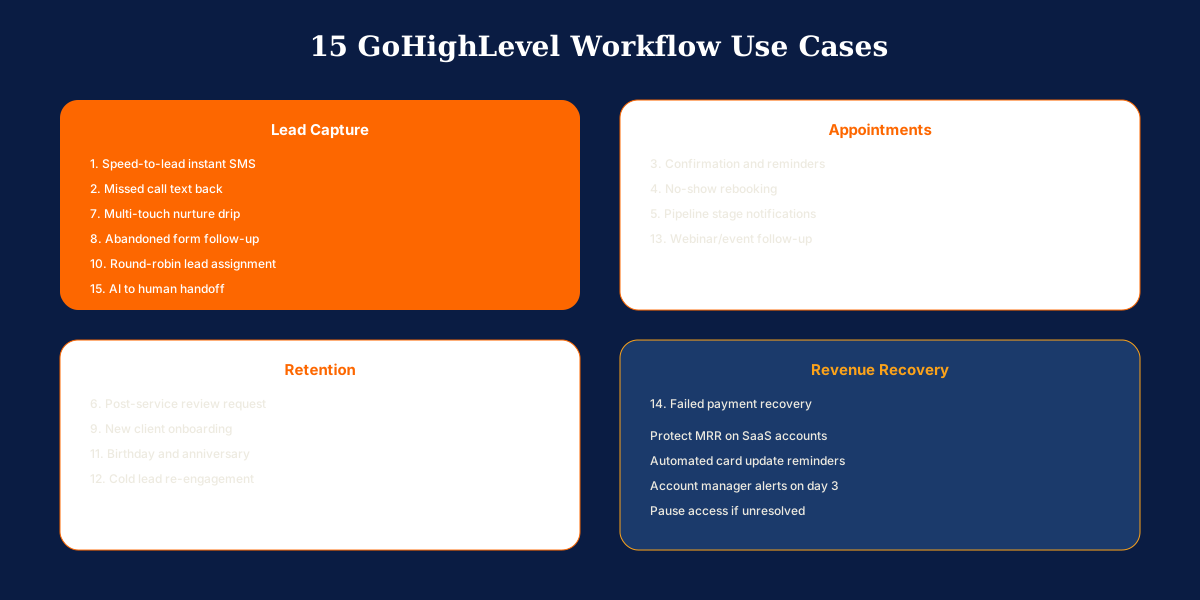
| Workflow Type | Trigger | Primary Action |
|---|---|---|
| Speed-to-lead | Form submitted or Facebook Lead Ad received | Instant SMS with booking link within 60 seconds |
| Missed call text back | Inbound call missed | SMS asking how to help, routed to unified inbox |
| Appointment reminders | Appointment booked | Confirmation plus 24-hour and 2-hour reminders via SMS and email |
| No-show rebooking | Appointment status changed to no-show | Empathetic SMS with reschedule link and team notification |
| Review request | Pipeline stage Completed or tag Job Done added | Review request SMS after 2-hour wait with gentle reminder |
| Lead nurture drip | Tag Nurture added or form submitted without booking | Multi-touch email and SMS sequence over 14 days |
| New client onboarding | Payment received or stage changed to Enrolled | Welcome sequence, intake form, and kickoff booking over 7 days |
| Failed payment recovery | Payment failed or subscription status changed | SMS and email with update link plus account manager alert |
What Are GoHighLevel Workflows?
GoHighLevel workflows are visual automation sequences built inside the platform's workflow builder. Each workflow starts with a trigger event, such as a form submission, pipeline stage change, appointment booked, or tag added, and then executes a chain of actions across SMS, email, CRM updates, tasks, and external webhooks.
Workflows live inside each sub-account and connect directly to the CRM, calendars, funnels, and communication channels. That native integration is what makes GoHighLevel automation more powerful than a standalone email tool. Every action happens in the context of the full contact record, pipeline stage, and conversation history.
Agencies treat workflows as reusable assets. Build a proven speed-to-lead sequence once, package it in a snapshot, and deploy it to every client account in minutes. Businesses that master workflows stop trading hours for follow-up and start scaling delivery without hiring more admin staff.

Complete Guide to GoHighLevel Workflow Automation
Every GoHighLevel workflow follows the same logic pattern: trigger, optional filter, action, optional wait, optional branch, repeat. Understanding these building blocks makes the use cases below straightforward to implement and adapt to your niche.
Triggers: What Starts a Workflow
Common triggers include form submitted, survey completed, appointment status changed, pipeline stage changed, contact tag added or removed, call status updated, payment received, and custom webhook received. Pick the trigger that matches the real-world event you want to automate.
Some workflows use multiple entry points. A nurture sequence might trigger when a specific tag is added from any form, funnel, or manual import. Keep triggers specific enough to avoid firing on the wrong contacts.
Actions, Delays, and Conditional Branches
Actions are what the workflow does: send SMS, send email, add or remove tags, update custom fields, move pipeline stage, assign to a user, create a task, add to another workflow, or remove from a workflow.
Wait steps pause the sequence for minutes, hours, or days. If/else branches split the path based on conditions like reply status, appointment booking, or contact tags. Branches prevent one-size-fits-all sequences and keep automation feeling personal.
Speed-to-Lead and Missed Call Recovery
Speed-to-lead fires on form submission or Facebook Lead Ad received and sends SMS within 60 seconds thanking the lead and offering a booking link. Contacting a new lead within five minutes dramatically increases conversion rates. Missed call text back triggers on inbound call missed and sends SMS asking how you can help, routing the reply to the unified inbox. Home services businesses lose jobs when callers reach voicemail and dial the next company on Google.
Appointment Management Workflows
Appointment confirmation and reminder sequences fire on appointment booked: immediate confirmation email and SMS, reminder 24 hours before, reminder 2 hours before with address or meeting link. No-show follow-up triggers when appointment status changes to no-show: empathetic SMS with reschedule link, wait 24 hours, send second follow-up if no booking, notify assigned team member. No-shows are not dead leads when a structured rebooking workflow recovers them.
Pipeline, Reviews, and Nurture Sequences
Pipeline stage change notifications alert assigned sales reps via SMS, create follow-up tasks with due dates, and send client-facing updates when appropriate. Post-service review requests wait 2 hours after stage Completed or tag Job Done, then send review request SMS with Google link and a gentle reminder after 3 days.
Multi-touch lead nurture drips send value email day 1, SMS check-in day 3, case study email day 7, and booking link day 14, removing contacts from the workflow if they book. Most leads are not ready to buy on first contact. Nurture sequences keep you visible until timing aligns.
Onboarding, Assignment, and Re-Engagement
New client onboarding triggers on payment received or pipeline stage changed to Enrolled: welcome email with next steps, intake form, kickoff call link, and onboarding resources over the first 7 days. Round-robin lead assignment assigns new leads to the next available rep and adds a task to call within 15 minutes.
Cold lead re-engagement fires when tag Cold Lead is added or no activity occurs for 60 days: re-engagement email with new offer, wait 5 days, SMS with limited-time incentive. Your existing database is cheaper to monetize than new ad spend.
Events, Payments, and AI Handoff
Webinar and event registration workflows send confirmation with calendar invite, reminder sequences before the event, post-event replay links for non-attendees, and sales follow-up for attendees. Failed payment recovery sends SMS and email with update payment link, second notice after 2 days, and account manager notification on day 3.
AI chatbot to human handoff triggers when conversational AI escalates to a human: notify assigned team member, create high-priority task, send internal SMS with conversation summary, and tag Hot Lead for priority follow-up. AI handles volume but humans close complex deals.
Who Should Build GoHighLevel Workflows First?
Any business losing leads to slow follow-up or manual processes benefits from GoHighLevel workflows. The priority order depends on your biggest operational leak, not on building every automation at once.
Local Service Businesses
Contractors, HVAC companies, and home services operators should build speed-to-lead SMS and missed call text back first. These two workflows alone recover more revenue than most businesses expect. Add appointment reminders and review requests once the foundation is stable.
Coaches and High-Ticket Consultants
Coaches selling discovery calls and programs benefit from nurture drips, abandoned form follow-up, and new client onboarding workflows. First-week experience determines retention on high-ticket offers, and automated onboarding sets expectations without manual admin work.
Marketing Agencies
Agencies should build core workflows in a sandbox sub-account alongside pipelines, funnels, and calendars, then package the complete system into a snapshot. Clients see measurable ROI from speed-to-lead and review request automations within the first week, which builds retention and recurring service revenue.
SaaS Resellers and Membership Businesses
Agencies reselling through SaaS Mode and membership businesses depend on failed payment recovery workflows to protect MRR. Automating billing chase without manual follow-up prevents silent revenue loss from expired cards.
Event and Webinar Hosts
Businesses running webinars, workshops, or live events should prioritize registration confirmation, reminder sequences, and post-event follow-up workflows. Event ROI depends on show rates and post-event sales follow-up, both of which automation handles at scale.

Things to Consider Before Building Workflows?
Strong workflow programs depend as much on discipline as on builder skill. Run through these factors before activating automations on live contacts.
- Pipeline and tag setup first: Workflows reference pipeline stages and tags constantly. Configure your CRM structure before building automations, or you will rebuild workflows when stages change.
- Test with your own contact record: Submit forms, book test appointments, and verify tags, messages, and pipeline updates fire correctly. Silent failures cost leads every day.
- Avoid overlapping workflows: If a contact is in a nurture sequence and a separate blast workflow fires simultaneously, they receive spam and unsubscribe. Use tags and exit conditions to prevent collisions.
- SMS compliance: Keep SMS messages compliant with opt-out language where required. GoHighLevel supports STOP handling, but your copy and consent capture at the form level must be correct from the start.
- Naming conventions: Name workflows clearly so your team understands purpose at a glance. Speed to Lead SMS and Review Request Post Job are better than Workflow Copy 3.
- Snapshot versioning: Version your snapshots as you improve workflows. Clients on older snapshots miss optimizations unless you have a process to push updates quarterly.
Which Workflows Should You Build First?
Start with speed-to-lead instant SMS and appointment confirmation plus reminder sequences. These two workflows recover more revenue than most businesses expect and require minimal setup beyond a form trigger and message templates.
Add missed call text back and post-service review requests once the foundation is stable. Expand to nurture drips, onboarding sequences, and payment recovery as your CRM structure matures.
Build one workflow at a time. Test thoroughly before activating the next. The biggest mistake is launching ten automations simultaneously and not knowing which one misfired.
Concluding Remarks on GoHighLevel Workflows
GoHighLevel workflows turn the platform from a CRM you log into into a system that works for you while you focus on closing deals and delivering service. Manual follow-up does not scale, and workflows encode your best process into automation that runs identically every time.
Agencies that package workflows inside snapshots deploy proven systems to every client in minutes instead of rebuilding from scratch. Offer workflow optimization as an ongoing service with monthly reviews of trigger performance and conversion by stage.
Need GoHighLevel workflows built, tested, and packaged in a deployment-ready snapshot? Book a free call about our GoHighLevel setup services. We configure automation systems for agencies and local businesses every week.