


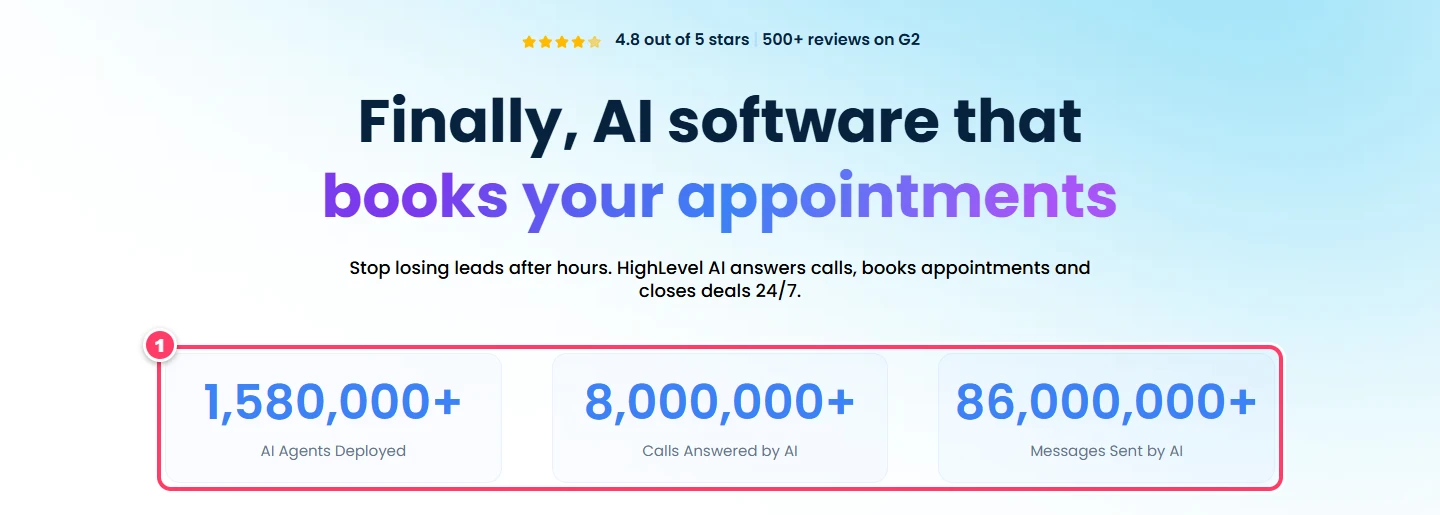
The GoHighLevel AI Employee is HighLevel's bundle of AI tools that answer calls, reply to messages, respond to reviews and draft content inside your account. It is already working at scale: the HighLevel AI page reports more than 1,580,000 AI agents deployed, 8,000,000 calls answered by AI and 86,000,000 messages sent by AI.
Turning these AI employees on is the easy part. The hard part is picking the right plan, knowing what a call or a chat really costs, and setting up agents that hand off to a person at the right moment. This guide covers all three, with screenshots of the actual Voice AI screens and pricing taken from the HighLevel help center in October 2026.
Quick Verdict: Is the GHL AI Employee Worth It?
Yes, if missed calls or slow replies are costing you leads. Start on pay-per-use if your volume is low, move to the $50 Growth plan once you need a set allowance, and choose Unlimited when calls and chats run all day. Phone carrier charges are always extra, so budget for them separately.
| Your situation | Where to start |
|---|---|
| Testing AI on a few conversations | Pay-per-use, no plan fee |
| A local business with steady calls | Growth, at $50 |
| High call and chat volume all day | Unlimited, at $97 |
| An agency reselling AI to clients | The $497 agency plan, then rebill or resell |
What Is the GHL AI Employee?
The AI Employee is not a single bot. It is a set of AI products that share one plan and one bill per client account. Some talk to your customers by text, phone and review replies. Others work for your team, writing drafts, building pages and running steps inside your automations.
A useful way to picture it: the CRM is the operating system, and AI employees are the staff working inside it. Because the AI lives inside HighLevel, it can read the contact record, check the calendar, book the slot and, through a workflow, move the deal along your pipeline without any extra connector. That is the main difference from bolting separate AI tools onto your CRM and marketing stack.
For a wider look at every AI feature on the platform, including the free ones, see our guide to GoHighLevel AI features.
What the GHL AI Employee Includes
HighLevel lists the following products under the AI Employee. Think of them as AI employees with one job each, covering work that would otherwise land on a receptionist, a sales rep or a marketer.
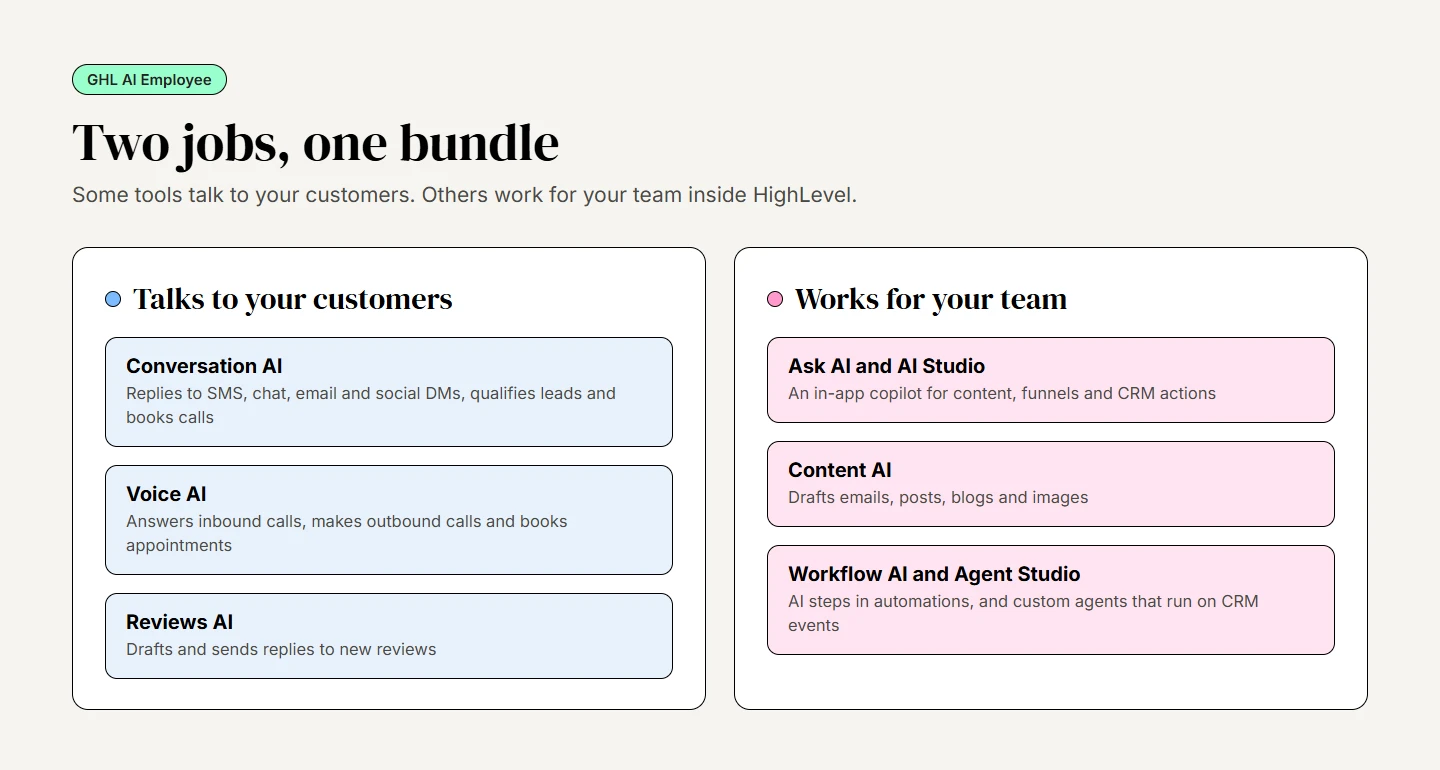
- Conversation AI: A chatbot that replies on SMS, email, Facebook, Instagram, WhatsApp and web chat. It qualifies leads, answers customer support questions and books calls, either in Suggestive mode (drafts for your team to approve) or Auto-Pilot (replies on its own).
- Voice AI: Voice AI answers inbound calls, places outbound calls once you are approved for them, and can book appointments, send texts or transfer the caller to a person.
- Reviews AI: Writes and sends replies to new reviews so no rating sits unanswered.
- Content AI: Handles basic drafting for emails, social posts, blogs and images. Treat its AI-generated copy as a first draft and review it before you publish.
- Ask AI and AI Studio: Ask AI is a built-in copilot in the top bar and sidebar. You can use Ask AI for building funnels, writing content or making CRM changes such as creating a contact.
- Workflow AI: AI actions inside a workflow, such as intent detection, summaries, translation and a decision maker that picks the next branch.
- Agent Studio and Managed Agents: A builder for custom agents that run in the background on CRM events, covered in its own section below.
Several AI features are free with fair use for everyone, even without an AI Employee plan: Funnel and Website AI, Email AI, Calendar AI, Layout AI, the Knowledge Base and the Workflow AI Builder.
GHL AI Employee Plans and Pricing for 2026
The AI product pricing article on the HighLevel Support Portal lists three AI Employee plans plus pay-per-use. Every price below is per sub-account, per month. AI Employee Growth costs $50 a month and AI Employee Unlimited costs $97 a month per sub-account.
| Plan | Price | What is included |
|---|---|---|
| Pay-per-use | No plan fee | You pay for each reply, minute or action at the standard rates |
| Starter | $20 / month | Standard Ask AI, AI Studio and Creator Studio usage; limited to certain $497-plan agencies |
| Growth | $50 / month | 1,000 Conversation AI responses and 100 Voice AI minutes, 100 Managed Agent runs, unlimited Reviews AI and Content AI |
| Unlimited | $97 / month | Unlimited chat, voice and review replies under fair use, plus 1,000 Managed Agent runs |
Two details catch people out. First, when a Growth allowance runs out, extra usage is paused by default; the agency has to switch on Extra Usage before anything is billed past the limit. Second, "unlimited" means unlimited under the HighLevel fair-use policy, not without any ceiling. Agent Studio stays pay-per-use on every plan.
Is Growth worth it for calls alone? At the pay-per-use engine and voice rates, 100 minutes come to about $6 before tokens and phone charges. The plan earns its $50 through the whole bundle: the 1,000 chat responses, the Managed Agent runs and unlimited review replies on top of the minutes.
What a Voice AI call really costs
On pay-per-use, a call is priced as call minutes × (engine rate + text-to-speech rate), plus the AI model's tokens and the phone charge. The voice engine has cost $0.045 per minute since May 20, 2026, and OpenAI TTS-1 adds $0.015 a minute. Premium ElevenLabs voices cost more, from $0.035 to $0.17 a minute.
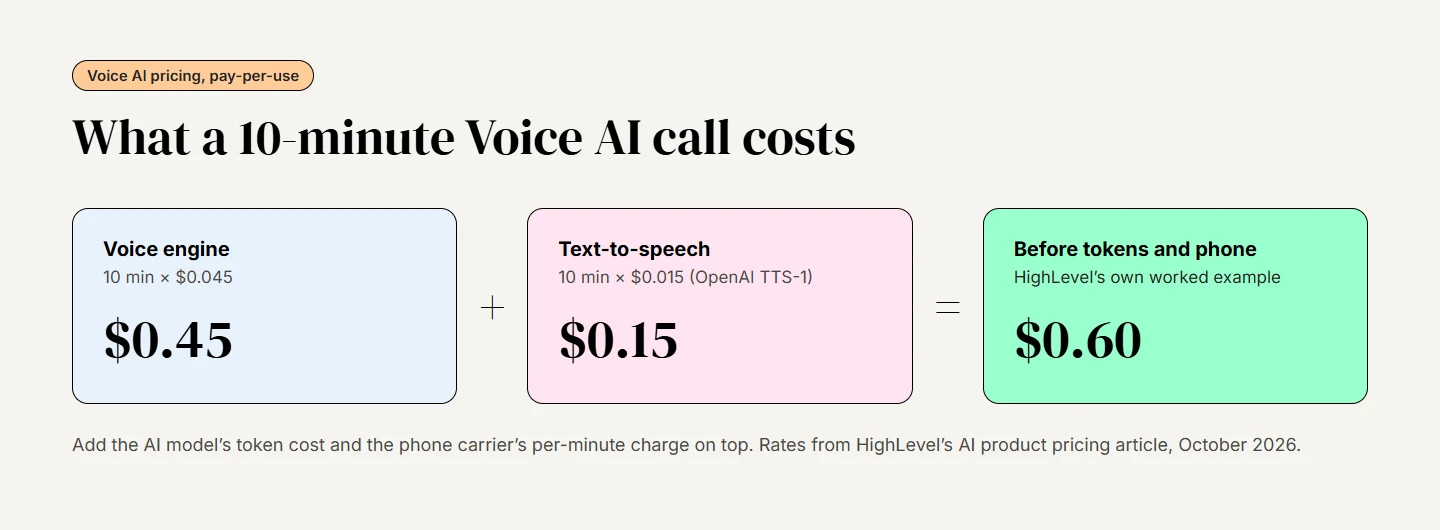
Chat replies are priced by tokens rather than per message, so the cost depends on the model. GPT 4.1 Mini, for example, is $0.40 per million input tokens and $1.60 per million output tokens. Reviews AI is $0.01 per AI-assisted reply you send, and the four suggestions it generates per review are free.
Phone charges with LC Phone or Twilio
Every AI phone call also runs over a phone line, and that carrier cost is billed separately on every plan, Unlimited included. Voice AI works with LC Phone or Twilio numbers. Check the current pricing in your own account before you quote a client, because HighLevel notes that AI rates and included usage can change.
How to Deploy a Voice AI Agent With the GHL AI Employee
Voice AI is the first of your AI employees most accounts should set up, because it picks up the calls you are missing today. The steps below follow the official Voice AI guide, with screenshots from that guide.
Step 1: Open Voice AI and create an agent
In the sub-account, go to AI Agents, open the Voice AI tab and select the Agent List, where your Voice AI agents live. Click + Create Agent and pick one of three starts: Browse Marketplace for a ready-made agent, Create Custom Agent to start from a prompt, or the Flow Based Builder to lay out the call flow visually.
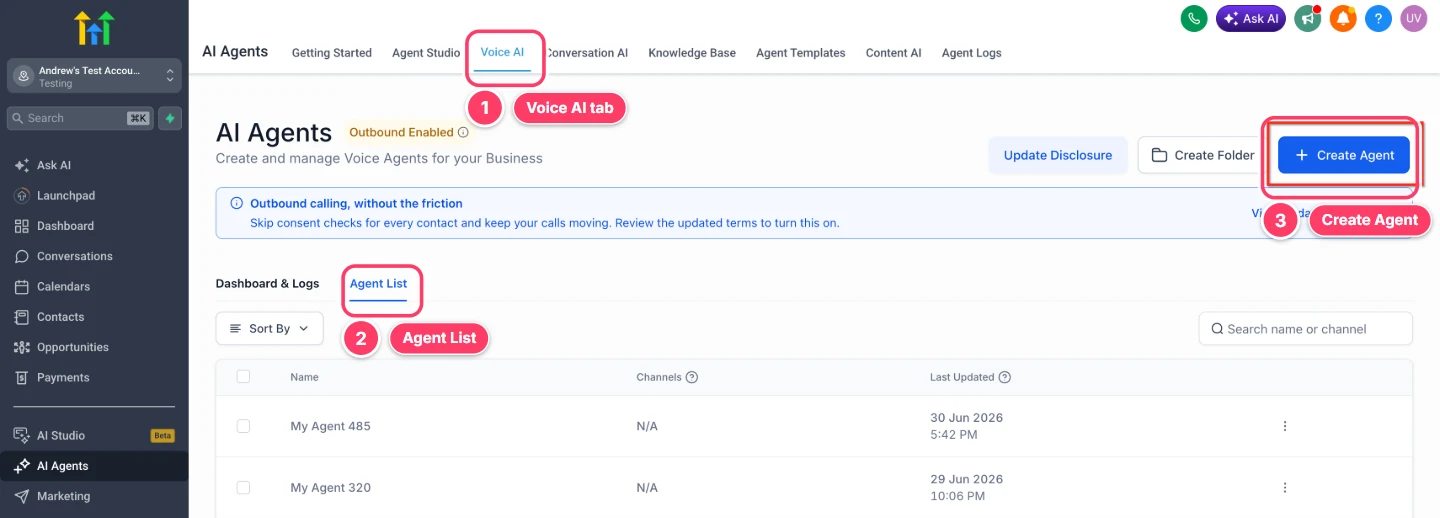
Marketplace agents are starting points, not finished agents. Replace their sample business details before the agent takes live calls.
Step 2: Write the prompt and add actions
Name the agent, then choose its voice, model, language and time zone. The prompt is the job description: what the agent handles, what it collects, what it must never discuss and when it hands the call to a person. Set a welcome message, then connect a Knowledge Base so the agent answers from your own pages and FAQs.
A prompt that holds up on real calls covers six things:
- The agent's role and the business it speaks for
- The details it must collect on every call
- Topics it may discuss, and topics it must refuse
- When to use each action, such as booking or texting a link
- When to transfer to a person or take a message
- How to close the call politely
Actions are what turn a talking bot into a working one. You can add Call Transfer, Trigger a Workflow, Send SMS, Update Contact Field, Appointment Booking, a custom webhook action and Agent Transfer. Appointment booking needs a HighLevel calendar connected. Caller information is gathered through the prompt and saved to the contact record with that field action.
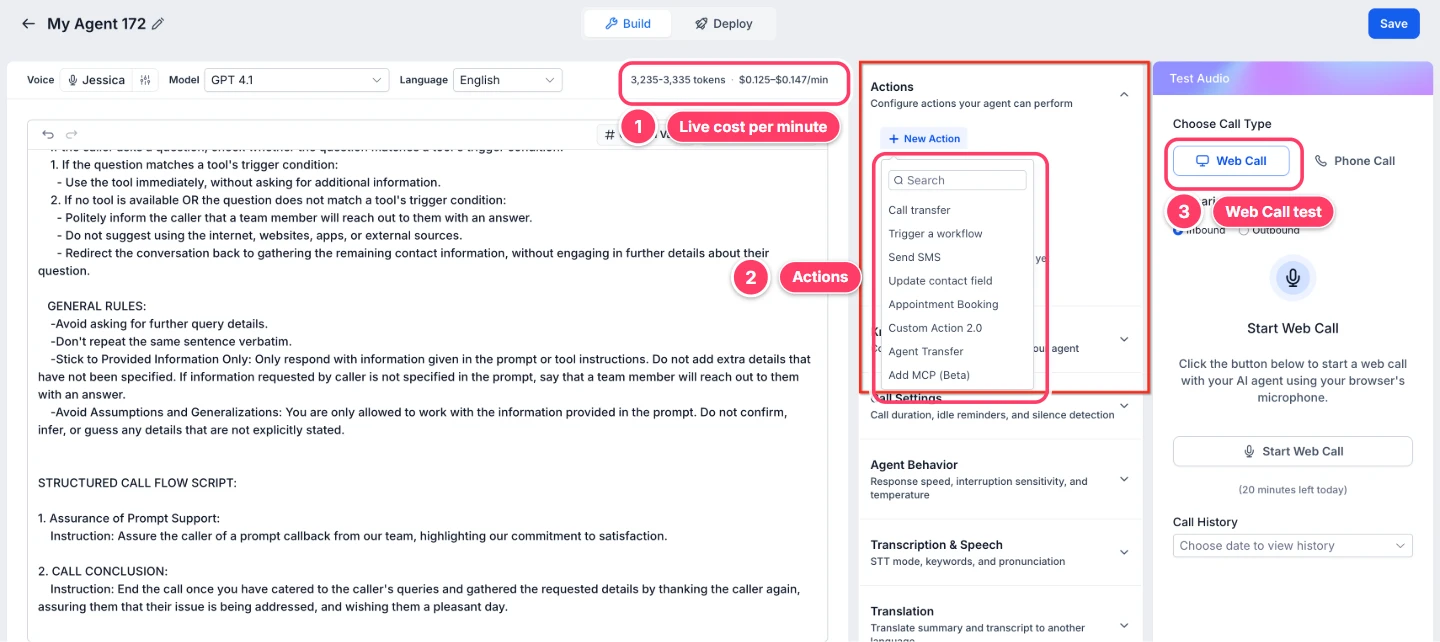
Notice the estimate at the top of the builder. It shows the prompt's token count and a per-minute price for the model you picked, so you can see how a longer prompt or a premium voice changes the cost before a single call.
Step 3: Run a web call test
Save the agent, open the test panel and start a Web Call. A web call test runs in your browser, with no phone number needed. Try common questions, an off-topic request, silence and interruptions. One limit: call transfers do not run in a web call, so test those with a Phone Call.
Step 4: Assign a number and set call routing
Open the Deploy tab and pick a number or number pool. Under call routing, choose Answer Calls Directly, or Use as Backup so the AI only steps in when nobody picks up. Then set working hours to All Hours or a custom schedule, for example to cover the time outside business hours.
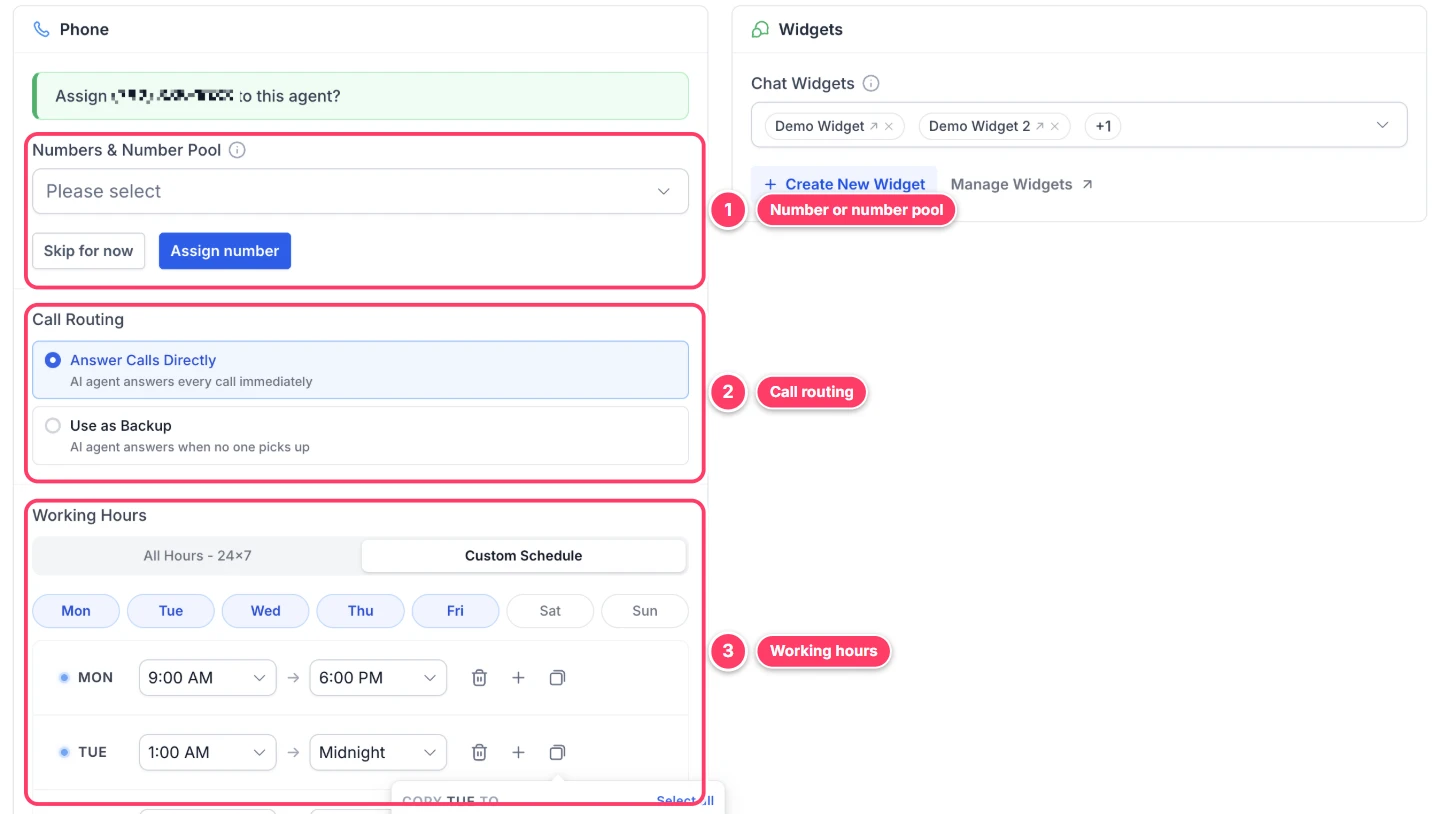
Voice AI agents can answer calls directly or act as a safety net behind your team, which makes Use as Backup a gentle first step. Outbound calling needs extra approval and an AI disclosure set up first, so plan for it rather than switching it on during week one. Our voice agent guide covers the outbound limits, consent rules and a 300-minute cost example.
Setting Up Conversation AI in the GHL AI Employee
It covers the text side. You can build a bot three ways: a guided form, a prompt, or a flow-based builder. New bots start switched Off, so nothing goes out until you choose a mode.
Begin in Suggestive mode. The bot drafts each reply in the inbox and a person approves it, which shows you exactly how it answers before it talks to anyone alone. Once a week of drafts looks right, move the routine channels to Auto-Pilot. Test lead capture, FAQs, booking and unknown questions first, as the official bot setup guide recommends. Some channels have their own rules: email replies need Auto-Pilot with the bot set as the primary bot, and replies to images only work in Auto-Pilot.
Pair it with a missed-call text-back flow and the bot can pick up the conversation the moment a caller hangs up. Each reply is logged on the contact, so your team sees the full history of customer interactions in one place. Between a phone agent and a text bot, these two AI employees cover most first contacts a small business gets.
Agent Studio: Custom Agents for the GHL AI Employee
Agent Studio is the drag-and-drop builder for agents that go beyond chat and calls. Its newest option, Managed Agents (formerly Super Agents), lets you describe a role in plain language and have a guided builder assemble the agent for you.
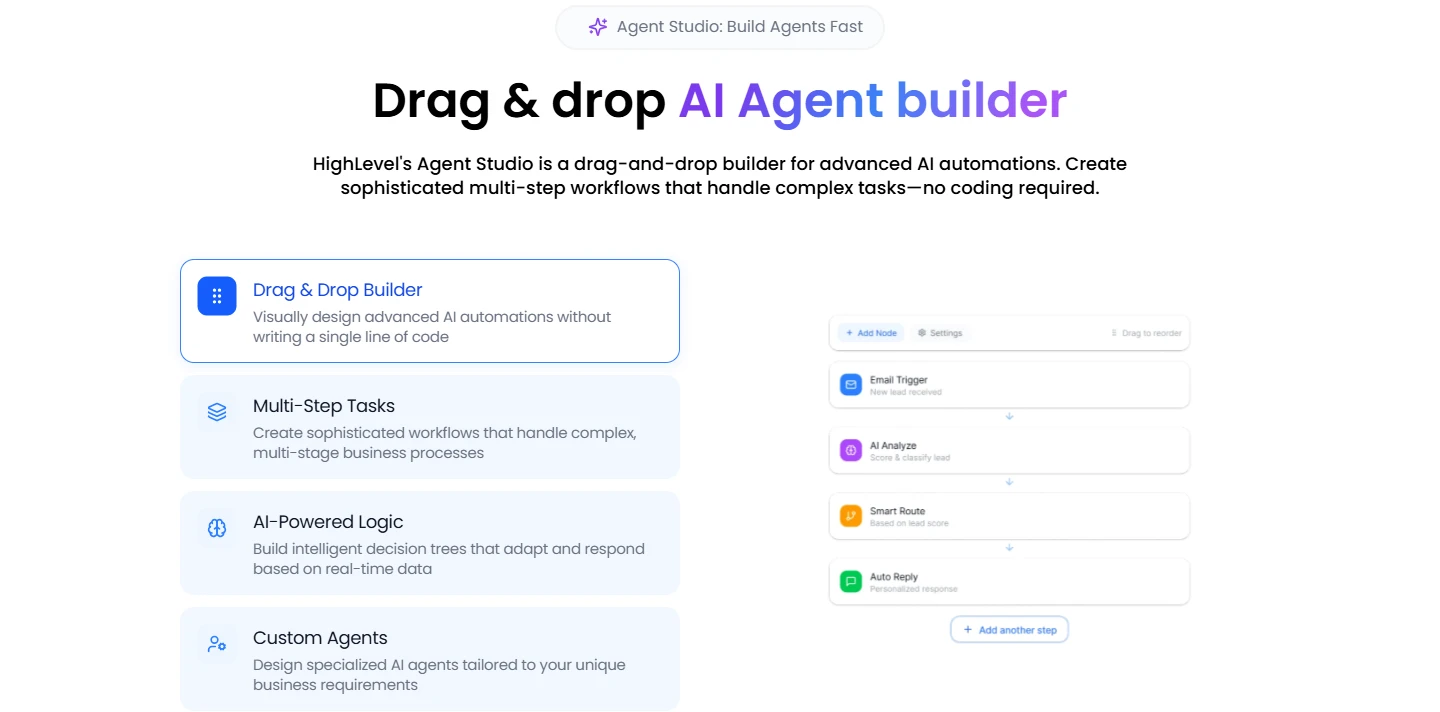
The difference from a chatbot is who starts the work. A Managed Agent runs on a CRM event, such as a new contact or a tag change, with nobody watching, and it can act in connected apps as well as in your account. Managed Agents were still in Labs (early access) when we checked, so expect changes. The official comparison article explains how they differ from the chatbot and Ask AI.
Good first jobs are narrow and easy to check: tag and route new leads, summarize a long thread for a rep, or start an AI sales follow-up when a deal goes quiet. For non-AI automation ideas to pair them with, our workflow automation guide has fifteen to copy.
Who Should Use the GHL AI Employee?
It fits anyone who would otherwise hire part-time help for the front desk, reviews and first drafts. These are the groups that tend to get the most from AI employees.
- Local service businesses: Plumbers, roofers and cleaners lose jobs to unanswered calls. Voice AI as a backup to your team plus a text bot covers nights and weekends. Our guide for home service businesses shows the full setup.
- Medical and wellness practices: Front desks at clinics and med spas cannot keep up at peak hours, and Voice AI takes the overflow. Clinics that handle patient details should read the HIPAA add-on terms first, because AI coverage is only partly documented.
- Coaches and consultants: Conversation AI handles discovery-call questions from a landing page while Content AI drafts nurture emails. High-ticket sales calls still need a person.
- Marketing agencies: Agencies build the agent once in a test account, then roll it out to clients with ready-made snapshots. The AI Employee lives inside each client's account, answering their leads, calls and reviews. The agency's own back office is a separate job: research, SEO briefs, client reports and proposals. Some agencies hand that internal work to Tenbrain's AI employees, which run on the ChatGPT, Claude or Grok plan the team already pays for and ask for approval before anything is sent.
- Multi-location brands: When call volume is high every day, Unlimited makes the monthly bill predictable, though phone charges still scale with minutes.
Rebilling and Reselling the GHL AI Employee as an Agency
Agencies have two ways to make money from AI, and the AI Employee access article treats them separately. Both need the $497 a month agency plan for rebilling.
- Rebilling: You charge clients for what their AI uses, either with a markup on the HighLevel cost or at a fixed rate per message or Voice AI minute. A fixed client rate does not change what HighLevel charges you.
- Reselling: You sell Starter, Growth or Unlimited as a recurring subscription at your own price, set up under Reselling, then Subscriptions.
To give a client access, switch to Agency View, enable AI Employee under Settings, then Company, and grant access to the sub-accounts you choose from AI Suite, then Plans & Limits. To charge for usage, configure rebilling from the three-dot menu next to each account. If you package AI into your own software plans with SaaS Mode, pick the AI Employee tier in the SaaS Configurator, and check our white-label pricing breakdown so the margin still works once usage is added.
Mistakes to Avoid With the GHL AI Employee
AI employees fail the same way new staff do: vague instructions, no supervision and nobody to escalate to. These are the mistakes we see most.
- Switching everything on at once: Missed calls point to Voice AI, slow replies to the chatbot, a quiet review page to review replies. Fix one leak, measure for 30 days, then add the next.
- No escalation rules: Complaints, price negotiations and emergencies should go to a person straight away. Write that into every prompt and add a transfer action.
- A stale knowledge base: When prices or services change and nobody updates the Knowledge Base, the AI keeps quoting the old ones. Review call logs and transcripts weekly in the first month.
- Forgetting phone and token costs: Unlimited covers the AI, not the carrier. Watch AI usage and phone charges together on the billing page.
- Skipping real tests: A web call proves the script; only a phone call proves transfers and routing. Test both before a client hears the agent.
Final Verdict on the GoHighLevel AI Employee
The AI Employee is the most practical way to automate first replies inside an all-in-one marketing platform, because the AI already sits on top of your contacts, calendars and workflows. Between base plan pricing and AI Employee costs, the numbers are now clear enough to plan around: pay-per-use to test, $50 for a set allowance, and $97 for heavy use, with phone charges on top.
Not on HighLevel yet? The 14-day free trial is the easiest way to see the AI screens for yourself, and our GoHighLevel pricing guide covers the base plans, starting with the $97 per month Starter plan. If you would rather have agents built and tested for you, our GoHighLevel specialists set up AI with proper escalation rules, or book a call about our GoHighLevel setup services.
Bottom line: Start with one Voice AI agent on backup routing and one Conversation AI bot in Suggestive mode. Once both have handled a few weeks of real calls and chats cleanly, pick the plan that matches the volume you actually see.