



GoHighLevel CRM is where every lead, message, and deal on the platform eventually lands, yet most accounts treat it like a contact dump. Funnels and automations keep firing, but revenue stalls when pipelines are misconfigured, smart lists go stale, or the unified inbox gets ignored.
The difference between a glorified address book and a real revenue engine comes down to how you wire contacts, stages, tags, and reporting together. Below, we walk through each CRM layer, who it fits best, and how agencies run isolated accounts for every client from one dashboard.
Quick Verdict: GoHighLevel CRM
Choose the GoHighLevel CRM when you want contact management, pipelines, SMS, email, funnels, and calendars sharing one record instead of a traditional CRM glued to five other tools. It fits agencies managing multiple client sub-accounts, local service businesses chasing speed-to-lead, and coaches selling through funnels and discovery calls. Skip it if you need enterprise attribution reporting, Salesforce-centric workflows, or a 1,000-app marketplace as your primary stack. For most agencies with five or more SMB clients, the Unlimited plan at $297 per month replaces a scattered CRM plus marketing tool stack that often exceeds $800 per month before per-seat fees.
| CRM Feature | What GHL Does | Why It Matters |
|---|---|---|
| Contact records | Unlimited contacts with full activity timelines on agency plans | Every message, call, and form submission lives on one record instead of scattered tools |
| Smart lists | Saved dynamic segments by tags, fields, source, and pipeline stage | Targeted follow-up and bulk actions without manual spreadsheet exports |
| Pipelines | Visual boards with custom stages and opportunity values | Stage changes trigger automations and show revenue at a glance |
| Unified inbox | SMS, email, phone, Facebook, Instagram, WhatsApp, and web chat in one thread | Teams reply faster without switching between five apps |
| Custom fields and tags | Unlimited fields plus tag-based segmentation and automation triggers | Clean data hygiene keeps automations firing on the right contacts as you scale |
| Calendars and reporting | Booking tied to CRM records with pipeline and source attribution | You see which lead sources close, not just which ones produce volume |
What Is the GoHighLevel CRM?
The GoHighLevel CRM is a contact and pipeline management system built into the wider GoHighLevel platform. It stores every lead and customer as a contact record with a full activity timeline, then connects that record directly to marketing automation, funnels, calendars, and communication channels.
Where a traditional CRM stops at contact management and pipeline tracking, the GoHighLevel CRM triggers automations, sends SMS and email, books appointments, and moves deals through stages without leaving the platform. Your CRM is not a passive database. It is the engine that runs follow-up automatically.
For a wider overview of everything the platform does beyond the CRM, see our guide on what GoHighLevel is. This guide focuses specifically on the CRM layer and how to configure it correctly.
Complete Guide to the GoHighLevel CRM
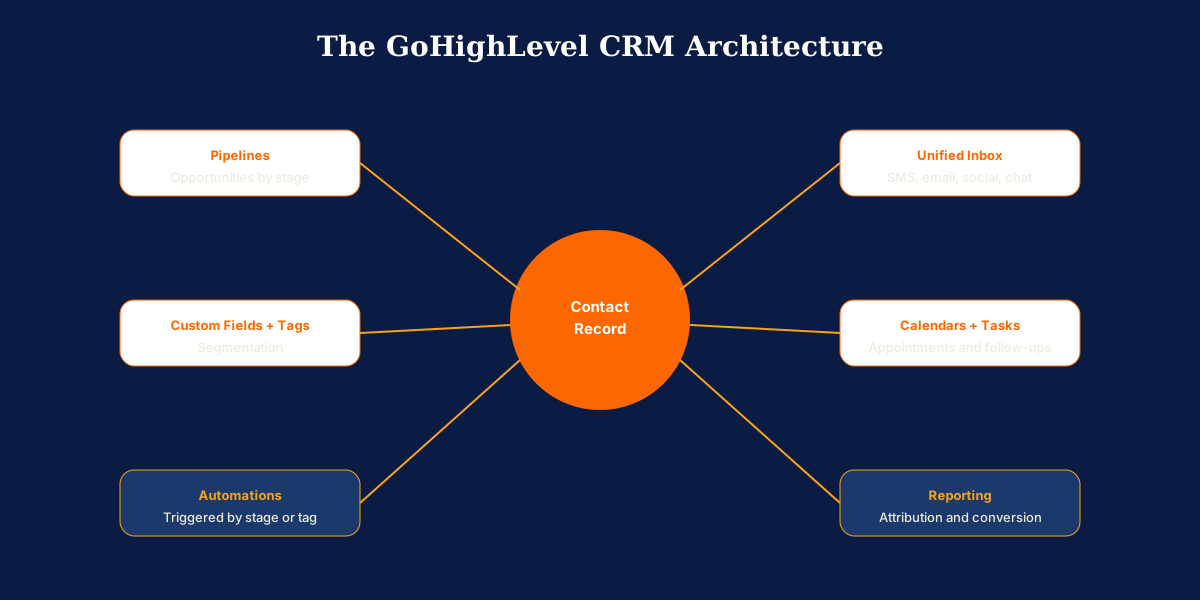
The GoHighLevel CRM breaks into a handful of core components that work together. Configure each one around how your business actually sells and the CRM turns raw leads into tracked, followed-up, closable opportunities.
Contacts and Smart Lists
Every lead and customer lives as a contact record with unlimited fields, a full activity timeline, and the complete history of every message, call, appointment, and pipeline movement. Smart lists let you filter contacts by any combination of tags, fields, source, or pipeline stage and save those filters for repeat use.
Smart lists are how you turn a large database into targeted segments: unresponsive leads from last month, buyers in a specific city, or clients due for a renewal. Those segments feed directly into bulk actions and workflow automations.
Pipelines and Opportunities
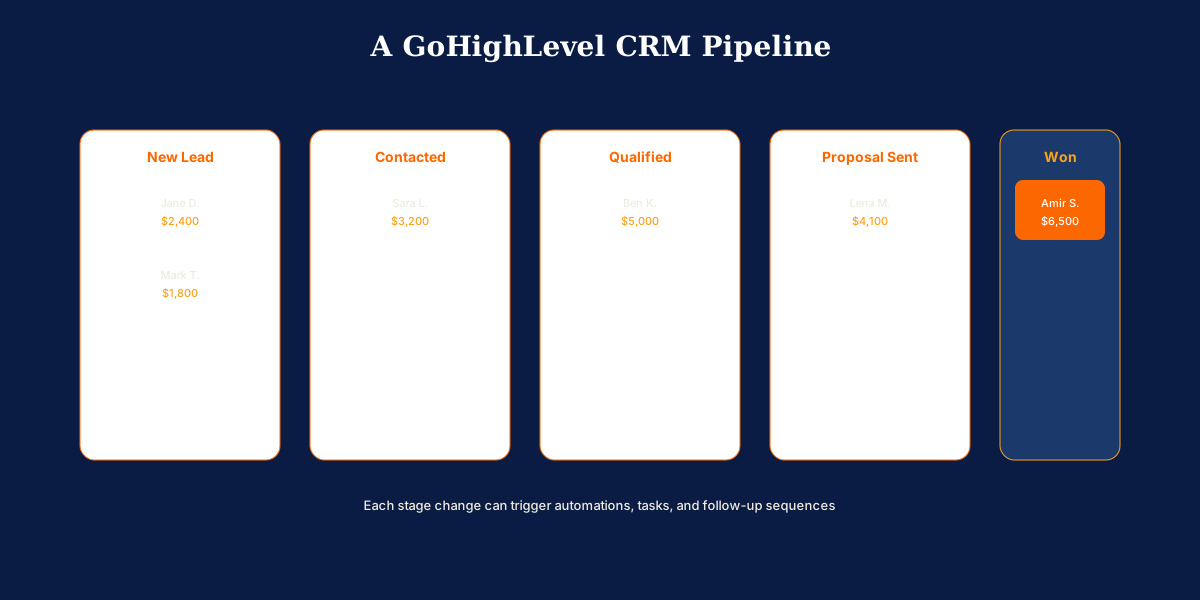
Pipelines are visual boards where each contact becomes an opportunity that moves through stages you define. A pipeline might run from New Lead through Contacted, Qualified, Proposal Sent, and Won. Each opportunity carries a value so you can see the total worth of every stage at a glance.
Stage changes can trigger automations automatically: move a deal to Proposal Sent and a follow-up sequence fires; move it to Won and an onboarding workflow starts. Agencies run separate pipelines per client sub-account with zero data bleed between accounts.
The Unified Conversations Inbox
The conversations inbox pulls SMS, email, phone, Facebook Messenger, Instagram DMs, WhatsApp messages, and web chat into a single thread per contact. Your team replies from one screen, and every message stays attached to the contact record.
Instead of checking five apps, your team sees the full conversation history in one place, and any team member can pick up where another left off. The unified inbox is where the CRM stops being a database and starts being a communication hub.
Custom Fields, Tags, and Segmentation
Custom fields store the data unique to your business: budget range, service interest, contract dates, or anything else you need on the record. Tags label contacts by intent, source, or behavior so you can segment and trigger automations precisely.
Good tag hygiene is what keeps a growing CRM usable. Define a clear tagging convention early so automations fire on the right contacts and segments stay clean as your database scales.
Calendars, Tasks, and Reporting
The CRM connects directly to GoHighLevel calendars, so a booked appointment updates the contact record, triggers reminders, and can move a pipeline stage automatically. Tasks let your team assign follow-ups with due dates tied to specific contacts.
The reporting dashboard tracks pipeline value, conversion by stage, lead source attribution, and campaign performance. Attribution is where many businesses find their most valuable insight: knowing which lead sources actually close, not just which produce the most leads.
Who Should Be Using the GoHighLevel CRM?
The GoHighLevel CRM fits operators who depend on fast multi-channel follow-up and want CRM, marketing, and communication in one system. The sub-account model makes it especially strong for agencies, while native SMS and pipelines suit service businesses that live and die on speed-to-lead.
Marketing Agencies
Agencies managing multiple client accounts should default to the GoHighLevel CRM. Every client gets an isolated sub-account with its own contacts, pipelines, and inbox, all managed from one agency dashboard. Snapshots let you clone a proven CRM structure into new client accounts in minutes instead of rebuilding from scratch.
Local Service Businesses
Contractors, HVAC companies, plumbers, and home services operators fit the GoHighLevel CRM well. SMS follow-up, missed call text back, review requests, and appointment booking connect directly to the contact record. The flat Starter or Unlimited plan replaces a scattered tool stack without per-contact overages.
Coaches and Consultants
Solo coaches and consultants selling programs, discovery calls, and high-ticket offers get funnels, calendars, nurture sequences, and payment pages tied to one CRM. Pipeline stages track enrollment from discovery call through onboarding without exporting data to a separate sales tool.
Real Estate Teams
Real estate agents and teams use separate buyer and seller pipelines, smart lists by neighborhood or price range, and automated follow-up on new leads from Zillow or Facebook. See our real estate guide for niche-specific pipeline structures.
SaaS Resellers on Agency Pro
Agencies on Agency Pro using SaaS Mode resell the GoHighLevel CRM as branded software to clients. The CRM becomes the product clients log into daily, with pipelines and automations preconfigured for their niche through snapshots and automated onboarding.

Things to Consider Before Setting Up GoHighLevel CRM?
Before you import contacts and build pipelines, run through the factors that determine whether your CRM setup scales cleanly or turns into a support burden within 90 days.
- Pipeline design before import: Map the exact stages your business moves a lead through before touching anything else. Pipelines drive most automations, and changing stages later breaks active workflows.
- Tag and field conventions: Define a tagging system early. Random tags from multiple team members make smart lists useless and cause automations to fire on the wrong contacts.
- Sub-account isolation for agencies: Never run multiple clients in one sub-account. The sub-account model exists so each client has isolated data, and mixing accounts creates compliance and reporting problems.
- Unified inbox staffing: The inbox only works if someone monitors it daily. Assign ownership or set notification rules so leads do not sit unanswered inside a well-configured CRM.
- Reporting expectations: GoHighLevel reporting covers pipeline value, source attribution, and campaign performance well. If you need multi-touch attribution or board-level revenue dashboards, compare against GoHighLevel vs HubSpot before committing.
- Usage costs on top of plan fees: SMS, phone minutes, and AI features bill separately regardless of tier. Model communication volume before quoting clients or setting your own budget.
Which CRM Setup Should You Start With?
Start with one pipeline that mirrors your actual sales process, three to five core tags, and the custom fields you need for segmentation. Connect the unified inbox and calendars next, then layer workflow automations on top of the structure.
Agencies should build the full CRM structure once in a sandbox sub-account and deploy it via snapshot to every client. Test with your own contact record before going live so tags, stage movements, and messages all fire correctly.
Single businesses on Starter at $97 per month get full CRM access for one account. Move to Unlimited at $297 per month when you need multiple sub-accounts. Agency Pro at $497 per month adds SaaS Mode when you are ready to resell the CRM as branded software.
Concluding Remarks on GoHighLevel CRM
The GoHighLevel CRM is strongest when you treat it as an active revenue system, not a place to dump imported contacts. Pipelines, tags, and the unified inbox work together, and skipping any layer leaves money on the table.
Build the structure once, test thoroughly, and deploy through snapshots if you manage multiple accounts. That discipline is what separates agencies that scale client rosters from those drowning in support tickets about lost leads.
Need the GoHighLevel CRM configured around how you actually sell? Book a free call about our GoHighLevel setup services. We build CRM systems for agencies and businesses every week.