



GoHighLevel AI features have moved from beta experiments to core parts of how agencies run client accounts in 2026. Turn everything on at once without training data or escalation rules and you get wrong answers, off-brand tone, and clients blaming the platform when a bot mishandles a hot lead.
Deploy AI with clear guardrails and the same team supports more sub-accounts with faster response times, recovering missed calls, qualifying leads, and booking appointments while humans focus on closing. Below, we walk through every major AI capability inside GoHighLevel, who should enable it first, and how to deploy responsibly at scale.
Quick Verdict: GoHighLevel AI Features
Enable GoHighLevel AI features when slow response times, missed calls, or repetitive inquiries cost you measurable revenue. Voice AI and conversational AI deliver the fastest ROI for local businesses that miss inbound calls during job hours. Content AI and workflow AI actions suit teams that have mastered basic automations and want intelligent branching on top. Skip turning on every AI tool at launch. Start with one feature aligned to your biggest leak, measure results for 30 days, then expand.
| AI Tool | What It Does | Best Starting Use Case |
|---|---|---|
| Conversational AI | Two-way SMS and web chat using trained knowledge bases | High-volume FAQ handling: hours, service areas, basic pricing |
| Voice AI | Natural-language agent answering inbound phone calls | After-hours and overflow call coverage for local service businesses |
| Booking Bot | Qualifies leads and books appointments into GHL calendars | Discovery call scheduling for coaches and consultants |
| Content AI | Drafts funnel copy, emails, SMS, and social posts | First-draft generation inside proven funnel templates |
| Workflow AI | Classifies replies, summarizes conversations, routes contacts | Intent-based routing and personalized follow-up in automations |
What Are GoHighLevel AI Features?
GoHighLevel AI features are built-in artificial intelligence tools that automate conversations, calls, content creation, and workflow decisions inside the same platform as your CRM, calendars, and automations. Unlike standalone chatbot apps, GoHighLevel AI reads from your contact records, pipeline stages, and calendar availability so responses and actions stay in context.
The platform groups AI into five categories: conversational messaging, voice, booking and qualification, content generation, and workflow-integrated AI actions. Each category serves a different job. Match the feature to the use case and outcomes improve immediately.
Most GoHighLevel AI features are usage-based rather than fully included in the base subscription. That pricing model makes ROI modeling essential before enabling AI across every client sub-account.
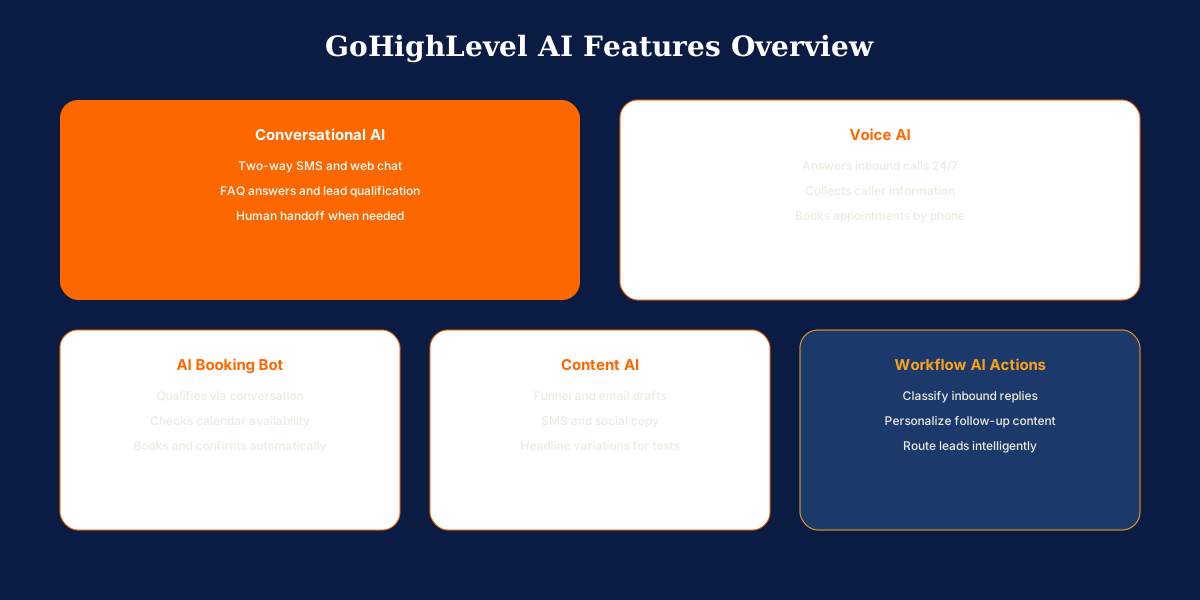
Complete Guide to GoHighLevel AI
Below is a feature-by-feature breakdown of every major AI capability inside GoHighLevel in 2026. Configure each one with clear training data, escalation rules, and workflow integration before going live on a client account.
Conversational AI for SMS and Chat
Conversational AI handles two-way text and web chat conversations using trained prompts and knowledge bases you configure per sub-account. The bot can answer FAQs, collect contact details, qualify interest, and hand off to a human when the conversation exceeds its scope.
Configure the bot's personality, business context, and escalation rules before going live. Strong deployments include specific service lists, pricing ranges, service area boundaries, and clear instructions for when to stop replying and notify a team member. Conversational AI works best for high-volume, repetitive inquiries, not complex sales conversations on high-ticket offers without human oversight.
Voice AI for Inbound Calls
Voice AI answers inbound phone calls with a natural-language agent that can greet callers, answer common questions, collect information, and route or book appointments based on your configuration. This is one of the highest-impact AI features for home services, medical offices, and any business where missed calls equal lost revenue.
Set business hours logic so Voice AI handles after-hours and overflow calls while live staff handle business-hour volume when available. Configure fallback behavior: if the AI cannot resolve the request, send an SMS follow-up or create a task for callback. Voice AI usage is metered separately from the base subscription.
AI Booking Bot and Appointment Qualification
The AI booking bot qualifies leads through conversation, checks calendar availability, and books appointments without human involvement. It integrates with GoHighLevel calendars so booked slots appear immediately with confirmation workflows firing automatically.
Qualification questions can filter out poor-fit leads before they consume calendar time. A med spa bot might confirm treatment interest and budget range. A coaching bot might confirm program fit before offering a discovery call slot. Pair the booking bot with pre-call and reminder workflows so booked appointments show up and convert.
Content AI for Funnels, Emails, and Social
GoHighLevel includes AI-assisted content tools for writing funnel copy, email drafts, SMS messages, and social posts. These tools accelerate first drafts but require human editing before publishing. AI-generated copy without brand review often sounds generic and hurts conversion on high-stakes pages.
Use content AI to overcome blank-page friction, generate headline variations for split tests, and draft nurture email outlines. Agencies benefit most when content AI is part of a template system inside proven funnel structures rather than building pages from scratch with unreviewed AI output.
AI Actions Inside Workflows
Workflow AI actions let automations call external AI models to classify replies, summarize conversations, generate personalized message content, or make routing decisions based on contact input. This is the most flexible AI layer because it connects to your existing trigger and branch logic.
Example use cases include analyzing an inbound SMS to determine intent before routing to the correct pipeline, generating a personalized follow-up based on form answers, or scoring lead quality before assignment to a sales rep. Workflow AI actions require more setup than out-of-the-box bots but produce more tailored results for agencies with specific routing needs.

Who Should Enable GoHighLevel AI?
GoHighLevel AI fits operators who lose revenue to slow response times or after-hours gaps. The right starting feature depends on your biggest operational leak, not on enabling every AI tool at once.
Local Service Businesses
Contractors, HVAC companies, and home services operators miss calls during job hours and lose jobs to competitors who answer faster. Voice AI for after-hours coverage and conversational AI for instant SMS response deliver the fastest ROI. Pair Voice AI with missed call text-back workflows for full coverage.
Medical and Wellness Practices
Med spas, dental offices, and wellness clinics benefit from the AI booking bot with qualification questions that filter poor-fit leads before they consume calendar time. Conversational AI handles appointment rescheduling and FAQ volume that front desk staff cannot keep up with during peak hours.
Coaches and Consultants
Coaches selling discovery calls benefit from the booking bot with program-fit qualification before offering a calendar slot. Content AI accelerates nurture email drafts and funnel copy inside proven templates. Complex high-ticket sales conversations still need human oversight and clear escalation rules.
Marketing Agencies
Agencies deploy AI inside sandbox sub-accounts alongside workflows and funnels, then push configurations to client accounts through snapshots. AI deployed poorly creates wrong answers and off-brand tone. AI deployed well lets one agency team support more client accounts with faster response times and lower labor cost per sub-account.
SaaS Resellers on Agency Pro
Agencies reselling through SaaS Mode should decide whether AI usage is included in client plans or billed as pass-through. Unclear AI billing creates margin surprises when a client enables Voice AI without understanding per-minute costs. Document AI pricing in client agreements before provisioning.

Things to Consider Before Turning On AI?
AI is a managed service, not a set-and-forget toggle. Run through these factors before enabling AI on live client accounts.
- Escalation rules before launch: Pricing negotiations, complaints, emergency requests, and any message the bot cannot answer confidently should route to a human immediately. Write these rules before going live.
- Knowledge base quality: Vague training produces vague answers. Include specific service lists, pricing ranges, service area boundaries, and policies. Update the knowledge base whenever services or pricing change.
- Usage-based pricing: Conversational AI, Voice AI, and workflow AI actions consume credits or per-minute fees. Model ROI before enabling AI on every client account. See the GoHighLevel pricing guide for current rates.
- One feature at a time: One FAQ bot on web chat beats a fully autonomous SMS agent handling every conversation on day one. Configure, test, and run for 30 days before adding the next feature.
- Weekly conversation review: Review conversation logs weekly during the first month. Call the Voice AI yourself. Text the bot the hardest questions. AI drifts when nobody monitors quality.
- Human judgment on high-stakes deals: AI handles volume and speed brilliantly. Complex sales conversations, sensitive complaints, and nuanced strategy still need a person. The best setups use AI as first responder, not final decision maker.
Which AI Features Should You Enable First?
Pick one AI feature aligned with the client's biggest leak. Missed calls: start with Voice AI or missed call text back. Slow SMS response: start with conversational AI. Low booking rates: start with the AI booking bot.
Configure, test with real scenarios your customers actually ask, and run for 30 days before adding the next feature. Measure booked appointments, response time, and conversation handoff quality.
Agencies should build AI settings inside a sandbox sub-account, test with real scenarios, then deploy through snapshots alongside existing workflows and funnels. Assign someone to maintain AI training monthly.
Concluding Remarks on GoHighLevel AI
GoHighLevel AI matters because it closes response-time gaps that directly cost revenue, but only when deployed with guardrails. The integration advantage is that AI reads from your CRM, pipeline stages, and calendar availability, behaving smarter than a standalone chatbot bolted onto a website.
Start narrow, measure results, and expand deliberately. Standalone chatbot platforms offer deeper customization for pure conversational use cases but lack native CRM and workflow integration. GoHighLevel AI wins when the goal is booking appointments, qualifying leads, and moving contacts through automations without middleware.
Need GoHighLevel AI configured with proper guardrails, escalation rules, and workflow integration? Book a free call about our GoHighLevel setup services. We deploy AI systems for agencies and local businesses every week.