



Yes, there is a GoHighLevel free trial, and it is the easiest way to test GoHighLevel before paying. Every plan comes with 14 days free, and HighLevel also runs an official 30-day route through its live bootcamp. There is no permanent free plan, so the trial is the only way to try the full feature set at no cost. It is a big platform to explore: the HighLevel homepage reports 179 million appointments booked and more than $5.2 billion in sales facilitated through it in 2025.
We walked through the official sign-up path in October 2026 and took the screenshots below, stopping before any card details. You will see where to click, what each screen asks for, what you can test, and how to spend the fourteen days so you know whether the software fits your business needs. If you are new to the platform, start with what GoHighLevel is.
Quick Answer: How the GoHighLevel Free Trial Works
You pick a plan, fill in a two-step form, add a card, and get two weeks of the full plan before the first charge. Cancel before the end date and you pay nothing for the subscription.
| Question | Answer |
|---|---|
| Trial length | 14 days on the standard sign-up, or 30 days through the official bootcamp page |
| Plans you can test | Any of the three paid plans |
| What the trial includes | Full access to the features of the plan you pick |
| Card needed? | Yes. The second step of the form collects billing details |
| What happens after two weeks | Billing starts automatically unless you cancel |
| Usage fees | Texts, calls, emails and premium AI usage can be charged during the trial |
| Free forever option? | No. Every plan is paid once the trial period is over |
How to Get the GHL Free Trial, Step by Step
There are two doors into the same sign-up form: the homepage and the plans page. Here is exactly what you will see on each.
Step 1: Visit the official GoHighLevel website
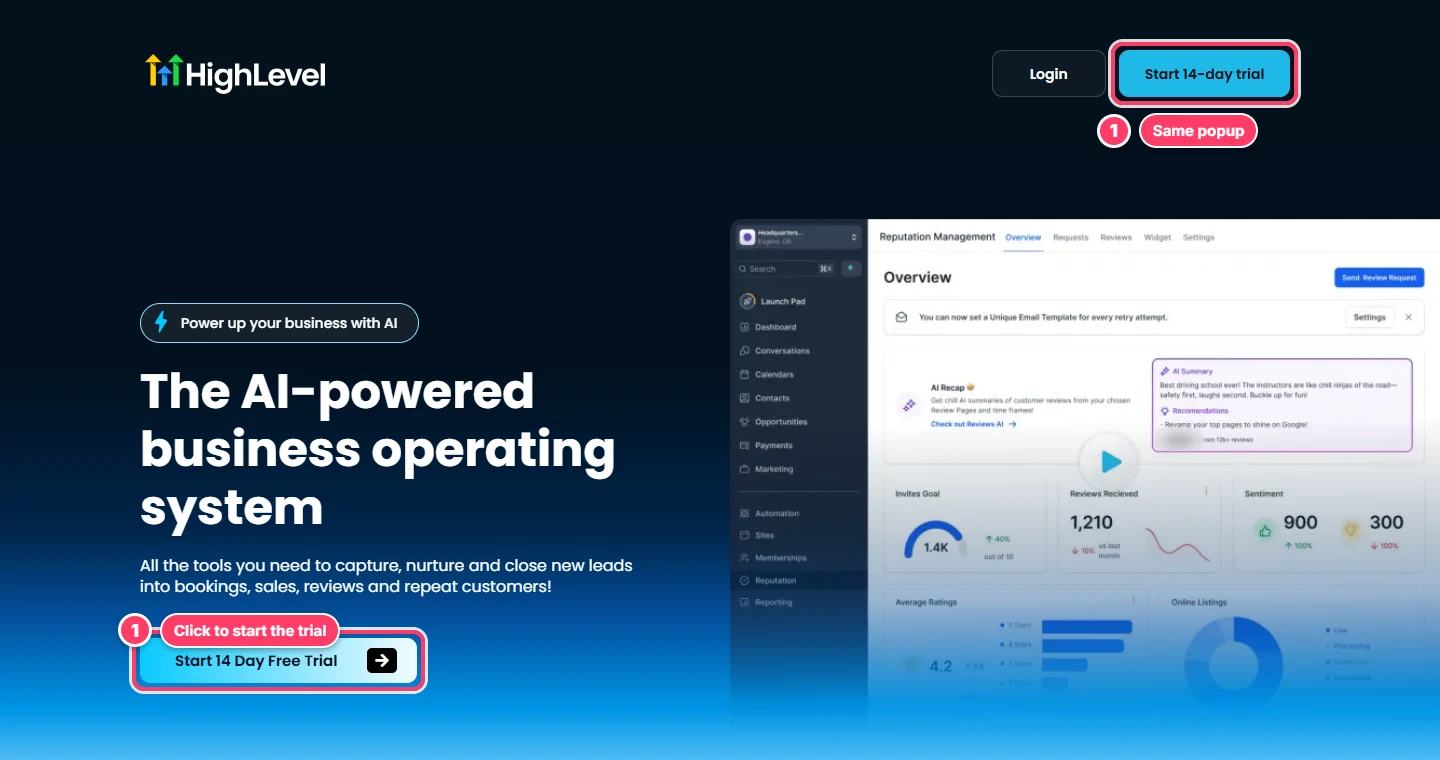
Go to gohighlevel.com directly, or through a partner link you trust. On the homepage, click Start 14 Day Free Trial in the main banner, or Start 14-day trial in the top corner. Both buttons open the same sign-up popup.
Step 2: Or start from the plans page
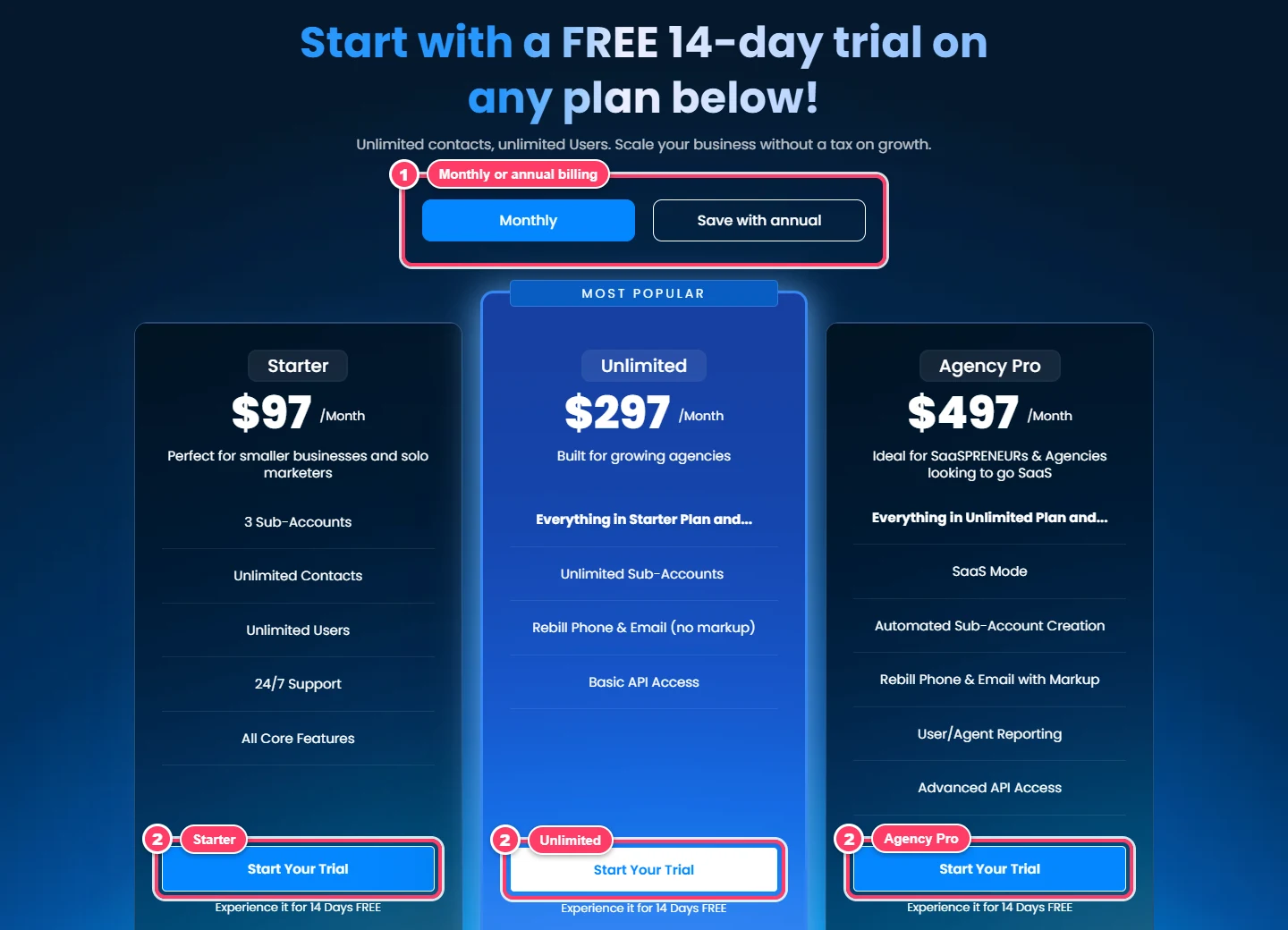
If you already know which tier you want, open the pricing page instead. Switch between monthly and annual billing at the top, then click Start Your Trial under Starter, Unlimited or Agency Pro. The trial gives you the tools of whichever plan you choose, so pick the one you expect to keep. Agencies with several clients usually test the Unlimited plan.
Not sure which tier fits? In short:
- Starter, $97 per month: Three sub-accounts, unlimited contacts and users, and all core features. Right for one business or a solo marketer.
- Unlimited, $297 per month: Unlimited sub-accounts, phone and email rebilling at cost, and basic API access. Built for growing agencies.
- Agency Pro, $497: Adds SaaS mode, automated account creation, rebilling with your own markup and advanced API access.
Our GoHighLevel pricing breakdown covers what each plan really costs once usage is added.
Step 3: Tell GoHighLevel about your business
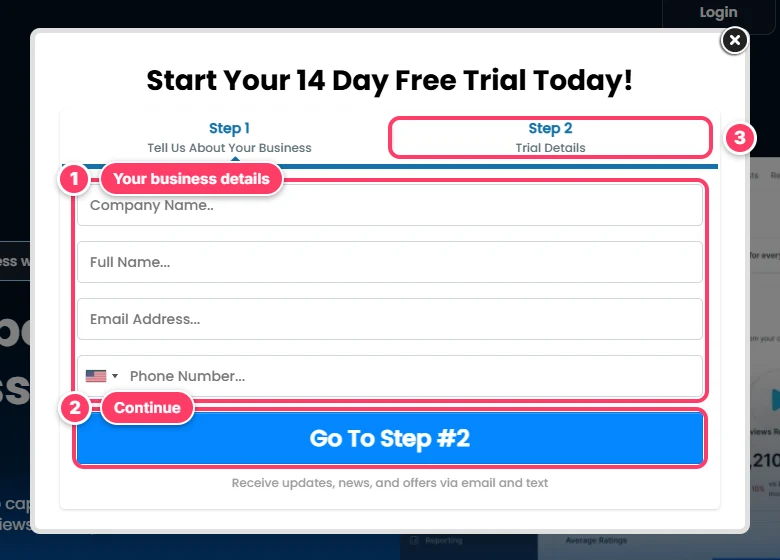
The popup has two steps. Step 1 asks for your company name, full name, email address and phone number. Use the email you want to log in with and a phone number you can reach, then click Go To Step #2.
Step 4: Enter your trial details and billing information
Step 2 is where you confirm your trial and add a card. We stopped here, so there is no screenshot of the card form, but the official bootcamp version of the same form labels this step "Payment Information: Your Billing Info." The subscription itself costs nothing during the trial, though usage charges for texts, calls and emails can still apply.
Step 5: Log in and start building
Once your account is created, sign in on the GoHighLevel login page. From the main dashboard you can create your first sub-account and start building.
How to Get a 30-Day Free Trial of GoHighLevel
The standard GoHighLevel sign-up gives you a 14-day free trial, but HighLevel also runs an extended trial alongside a free live bootcamp. Its bootcamp page offers 30 days free plus a live session with a coach, held every weekday at 11am CT.
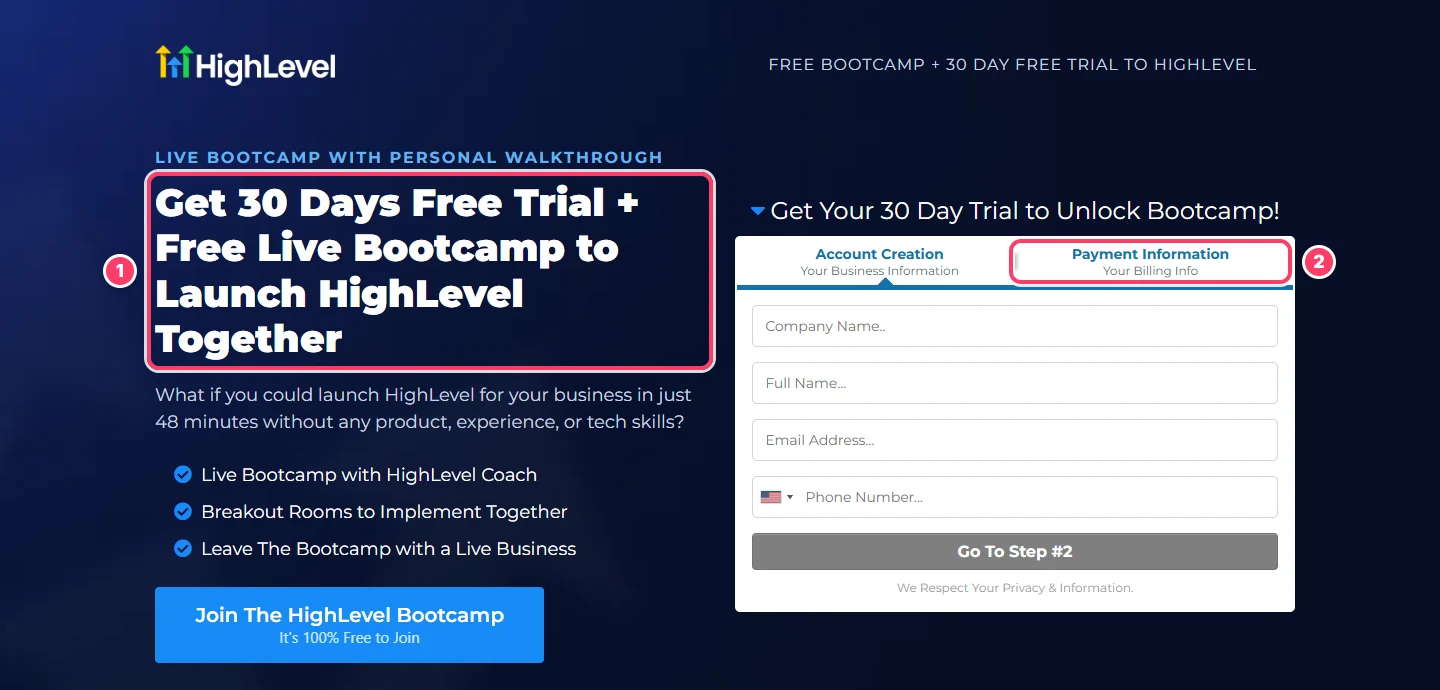
The page says the trial is free for 30 days and that you can cancel without paying the subscription cost, while communication surcharges can still apply. Some partners in the affiliate program also share their own 30 day links. Whichever route you take, trust the end date shown in your account rather than the number on a landing page.
Is the 30-day GoHighLevel offer worth it?
For most people, yes. Two extra weeks matter when you are waiting on texting approval or moving contacts from another CRM, and the bootcamp gives you a guided first build. If you prefer to work alone and move fast, the two-week path is quicker.
What You Can Test During the Trial
The free trial allows you to use every tool in your chosen tier, not a stripped-down demo. The pricing FAQ puts it plainly:
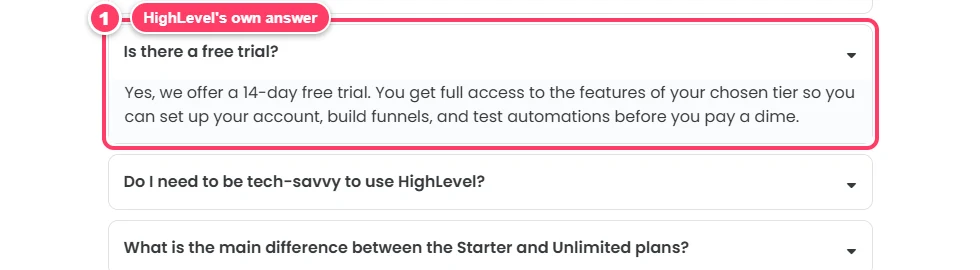
That means features such as CRM records, pipelines and calendars, plus the funnel builder, websites, email marketing, SMS, workflows and reporting: the same marketing tools paying customers use. In practice it is an all-in-one platform that replaces separate tools for marketing and sales.
CRM and lead management
Import a small contact list, set up one pipeline that matches how you sell, and watch how leads move. Lead management is where the GoHighLevel CRM earns its keep: every call, text and email sits on one contact record.
Funnels and landing pages
Build one landing page and a two-step sales funnel from a template, connect a form, and send a test lead through it to see where it lands.
Automation and workflows
Create a workflow that texts new leads, adds a tag and offers a booking link. This is the CRM and marketing automation core most people buy the platform for, and our workflow automation guide has 15 ideas to copy.
Calendars and booking
Connect a calendar, share the booking link and test the reminders. A missed-call text-back flow is another quick win that shows how the system can improve customer response times.
Agency and client tools
If you run an agency, create a test sub-account for a client, try client management from one dashboard, and look at the white-label options. Reselling GoHighLevel to clients through SaaS mode needs the Agency Pro plan.
Pros and Cons of the GoHighLevel Free Trial
After walking through the sign-up ourselves, here is how the GoHighLevel trial stacks up. Most of the downsides are about billing, not the software.
What we like
- The real product, not a demo: You get every tool in the plan you pick, so what you test is what you would pay for.
- Any plan is open: You can trial any of the three tiers, including the reselling tools on the top one.
- A longer route with coaching: The bootcamp offer stretches the trial to 30 days and adds a live session every weekday.
- Your work carries over: If you keep the plan, the account you built in simply becomes your paid account, so nothing has to be rebuilt.
- No contract: Billing is month to month, and you can cancel from your billing settings.
What to watch out for
- A card is required: You add billing details at sign-up, and the charge starts automatically if you forget to cancel.
- Usage is not free: Texts, calls, emails and premium AI features are billed as you use them, even during the trial.
- Texting approval takes time: US carrier registration can outlast two weeks, so you may not send live texts before the trial is over.
- No free plan to fall back on: Once the two weeks are up, you either pay or cancel. There is no limited free tier.
- A learning curve: There is a lot of software here, and the first few days can feel slow.
What to Set Up First: A Two-Week Plan
Two weeks goes fast. Here is how to use the trial so you finish with a clear yes or no.
Days 1 to 3: Foundations
Add your business details, connect a domain for sending email, buy a phone number, and start A2P 10DLC registration if you text US numbers. Carrier approval can take days, so do it first.
Days 4 to 7: Build one complete flow
Pick a single offer and build it end to end: a landing page, a form, a pipeline, a workflow that follows up by SMS and email, and a calendar for bookings.
Days 8 to 11: Test with real leads
Send real traffic through the flow, even a small amount. Check that alerts reach your team, that replies land in the shared inbox, and that bookings show up where your staff expect them.
Days 12 to 14: Decide
Review what worked, check the usage charges on your billing page, and choose which plan to keep before the trial ends.
Your trial starter checklist
- Domain connected and email sending set up
- Phone number bought and texting registration submitted
- One pipeline and one funnel live
- One workflow sending real follow-ups
- Calendar connected and a test booking made
- Team members invited with the right permissions
Five Mistakes That Waste the Trial
Most people who decide against the platform never gave it a fair run. These are the habits that cause it.
- Registering for texting late: Carrier approval can take longer than the trial itself, so submit it on day one, not day ten.
- Building everything from scratch: Start from a template or one of the ready-made snapshots for your industry, then customize it. You will see a working system in days instead of weeks.
- Testing alone: Invite the people who will use it every day. Their feedback on the inbox and the mobile app matters more than yours.
- Forgetting the end date: Put a reminder in your own calendar two days before the trial is over, so the decision is yours and not automatic.
- Judging it on first impressions: The interface takes a few days to learn. Judge it on whether one flow books real appointments, not on how the menus feel on day two.
Who Should Start the GHL Free Trial?
Anyone can sign up, but some businesses get far more out of two weeks than others. The ones that do best arrive with a clear use case and, ideally, a head start.
Marketing agencies
Agencies can test the thing they will actually sell: client accounts, white-label branding and, on the top tier, reselling. Trial the Unlimited plan if you manage several clients. If you would rather have the account structure built for you, our GoHighLevel agency team can set it up while the clock is running.
Home service businesses
Plumbers, cleaners and HVAC shops usually test missed calls and estimate follow-up first, because that is where jobs slip away. Our home services guide covers the setup, and a ready-built plumbing snapshot loads an eight-page site and 15 workflows into your trial account so you can test with real calls.
Dental practices and med spas
Clinics should check compliance before importing any patient data, so read our HIPAA compliance guide first. For a quick start, the dental practice snapshot comes with 20 ready workflows and six-month recall, and aesthetic clinics can use the med spa snapshot.
Real estate agents and coaches
Agents mostly test lead follow-up. Our real estate guide explains the setup, and the real estate snapshot adds three deal tracks and a 24-month drip. Coaches selling programs and memberships should read GoHighLevel for coaches before they start.
What Happens When the Trial Is Over
On the standard route, your card is charged for the plan you picked once the 14 days are up, and your first bill covers the month ahead. GoHighLevel offers month-to-month billing with no long-term contract, so you can upgrade, downgrade or cancel at any time.
How to cancel before you are charged
If it is not a fit, cancel before the end date. The billing help article describes the path: open Settings, then Billing, choose the option to modify or cancel your subscription, and follow the prompts to cancel the plan. The article also notes that agency accounts can't be paused, but a cancelled account can be resumed later.
Upgrading or switching plans
You can move up a tier at any point, and a mid-month upgrade is charged only the prorated difference. Moving down a tier is allowed too.
Is the GoHighLevel Free Trial Worth It?
The free trial is worth it if you treat it as a real build, not a tour. Evaluating GoHighLevel properly means connecting your real domain, phone number and leads. If you only click around the menus, two weeks will feel short and you will learn little. If you build one working flow, you will know by day 14 whether it beats what you pay for today.
That comparison is the real test. If you pay for tools like CRM, email and scheduling separately today, add up those bills and set them against the plan you trialed. Our honest GoHighLevel review covers the pros and cons, and the GoHighLevel alternatives list shows what else is out there.
Want a head start? Our GoHighLevel specialists can set up your account during the trial, so you test a finished system instead of an empty one.
Bottom line: Start the trial on the plan you expect to keep, build one complete flow in the first week, and decide before your end date. Using GoHighLevel on real work is the only way to know if it fits.